Tag Archive | "Mac"

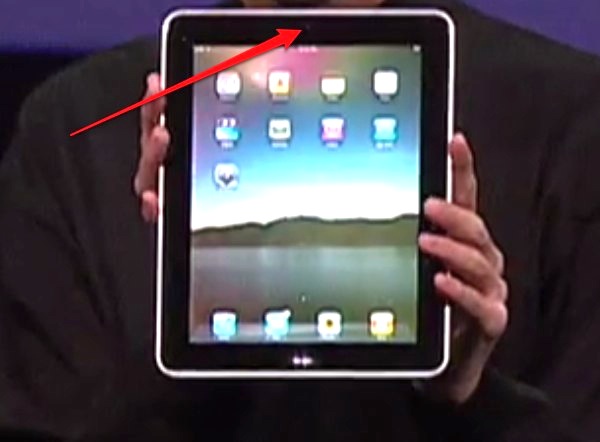
Rumor: iPad to have camera?! (PROOF?)


According to a screen capture @ 9 :09 in apples last week event there seem to be a embedded i-sight camera in Steve Jobs iPad. Although, it could be the ambient light sensor. Mission:Repair (Certified Mac Technicians) have reported to received repair parts for the iPad and there seem to be a camera area on those too!

What you guys think?


Popularity: 6% [?]

Posted in Apple, NewsComments

Apple Tablet coming this Month?


The first post of 2010!

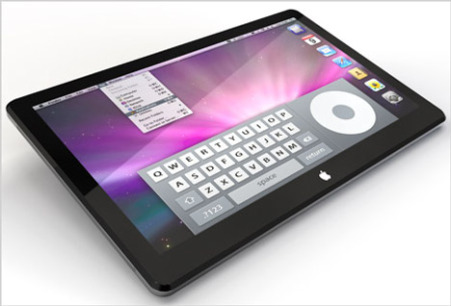
With all the concepts of what the Apples upcoming product the iSlate, iTablet or what ever apple may call it, everyone is really ready to see what this device will look like, the cost, and what the specs will be.  Rumors have it that apple booked the Yerba Buena Center for Arts, San Francisco for a major product announcement to take place on January 26, 2010.

The tablet is rumored to have all the abilities of a typical Mac, but of course Touchscreen.  This means that the tablets will a have a touchscreen UI. The tablet will most likely feature hand gestures to make navigation a breeze.  The tablet is also rumored to have a 10.1 inch screen and be around in the $1,000 range.

The Gadget 411 will keep you updated!


Popularity: 5% [?]

Posted in LaptopsComments

Apple adds video camera to iPod nano


overview_hero1_20090909Apple announced a new iPod nano with a built-in camera on Wednesday at the “Rock and Roll” event in San Francisco. Apple CEO Steve Jobs introduced the new model by citing the popularity of pocket flash memory-based video cameras like those from Flip and Kodak. “This market’s really exploding,” said Jobs, “and we want to get in on this.”

The new iPod nano comes in 8GB and 16GB models, each of which incorporates a video camera and microphone on the back of the unit, as well as a built-in speaker. The video camera shoots H.264 VGA video—640 by 480 pixels—at up to 30 frames per second with AAC audio in either portrait or landscape modes. It also features 15 special effects that can be applied in real time: Sepia, Black and White, X-Ray, Film Grain, Thermal, Security Cam, Cyborg, Bulge, Kaleido, Motion Blur, Mirror, Light Tunnel, Dent, Stretch, and Twirl. The nano can display video or sync it back to your computer, where you can easily upload the clip to YouTube, Facebook, MobileMe, or share it via e-mail. The microphone can also be used with the nano’s voice recording feature.

In addition, the nano now has VoiceOver support, which provides audible navigation cues in 20 languages, and the new Genius Mixes feature, which creates up to 12 endless playlists of music based on your existing library. There’s also a built-in pedometer which can measure your steps and sync the information with the Nike+ service and, in a first for an iPod, an FM radio tuner. The radio tuner includes support for live pause, which allows users to pause a live program and resume it later, and iTunes Tagging, which lets listeners tag radio songs they like and then preview and optionally purchase the song next time they sync with iTunes.

Other than the camera, the physical form factor of the nano remains mostly unchanged, although it now features a larger 2.2-inch, 240-by-376-pixel, display and comes in nine colors: silver, black, purple, blue, green, orange, yellow, (PRODUCT) RED and pink. The 8GB model runs for $149 and the 16GB for $179 (a discount from the previous nano, which cost $199). Both new models are shipping today.

The new nano requires Mac OS X 10.4.11 or later as well as iTunes 9. iPhoto 6.0.6 or later is recommended for Tiger users and iPhoto ‘09 for Leopard or Snow Leopard users. Windows users need Windows Vista or Windows XP Home or Professional with Service Pack 3 or later as well as iTunes 9.

Source [MACWORLD]

Popularity: 8% [?]

Posted in Features, Portable Audio/ VideoComments

Camera-equipped nano highlights ; Apple’s iPod changes


The iPod nano will now feature a built-in camera, as Apple updated its iPod line as part of a music-focused press event in San Francisco on Wednesday

The new iPod comes in 8GB and 16GB models, priced at $149 and $179, respectively. The music players now feature a video camera and microphone on the back of the device along with a built-in speaker. The nano can display video or sync it back to your computer for uploading to YouTube.

According to Apple CEO Steve Jobs—making his first public appearance at an Apple event since returning from a six-month medical leave—the company added the camera to the nano line to capitalize on the popularity of pocket-sized flash-based video cameras.

Get more details on the new iPod nano

The nano was just one of the changes Apple introduced to its iPod line on Wednesday. The company also cut the price on its entry-level 8GB iPod touch to $199; previously, that model sold for $229. In addition, Apple boosted the capacity on the touch to 64GB. The 32GB and 64GB models are now 50-percent faster and feature support for the Open GL|ES 2.0 graphics API.

Despite speculation that Apple might discontinue the iPod classic—the last remaining hard drive-based device in its iPod line—that model remains with an expanded capacity. The iPod classic now features 160GB of storage at the same price as before, $249.

As for the iPod shuffle, it comes in new colors. The 2GB and 4GB models sell for $59 and $79, respectively; a special edition 4GB model made of stainless steel costs $99.

iPod talk dominated the second half of Apple’s Wednesday event, but the company also had software news. A new version of the iTunes is now available, featuring Genius Mixes for creating recommended playlists of music and movies.

Other features in iTunes 9 include Home Sharing, which brings iTunes synchronization to up to five authorized computers and a new interface for managing iPhone and iPod touch applications. iTunes 9 also introduces a number of improvements to Apple’s online iTunes Store, including new artist pages with more visual material added.

Finally, Apple released a minor update to its iPhone software. iPhone 3.1 rolls out some bug fixes in addition to extending the Genius media-recommendation algorithm to recommend iPhone apps to users. The update also beefs up the iPhone OS’s ringtone capabilities.

Source : [MACWORLD]

Popularity: 6% [?]

Posted in Portable Audio/ VideoComments

iPod Camera Delays Possible


iPodTouch2Technical difficulties could delay the camera-equipped iPods widely expected at the Apple event on Wednesday, according to sources cited by AppleInsider. The unnamed source says that Apple is facing problems with the production of new iPods, more exactly with the camera hardware.

apple ipod camera
Apple’s iPod family
Apple is expected to introduce camera-equipped iPods at the special event, although, as usual, Apple did not disclose any information about what will be unveiled. However, photos of third-party iPod touch and nano cases sporting a camera hole have been doing the rounds online for a few months now — which led us to believe that Apple is indeed putting cameras into iPods.

But according to a report from AppleInsider, not everything is rosy in Apple land, because the Cupertino company is having technical problems putting cameras into iPods. Hardmac carries a similar report, which suggests the problem lies with the iPod touch camera module. Both publications say that this could mean the new iPods won’t hit the market this September.

If all the speculation about photo-equipped iPods is true, then we will most likely see 3.2-megapixel-camera-fitted iPods — basically the same image sensors found in the current generation iPhone 3GS. The iPhone 3GS’s camera features autofocus and video recording capabilities, but no flash is present. The software on the 3GS can also trim movies captured with the phone’s camera and upload them on YouTube.

The iPod classic, Apple’s only remaining hard-drive based music player, is not expected to get a camera upgrade. On the contrary, rumors suggest that Apple will drop the hard-drive based iPods, in favor of an all-flash memory lineup, just like Microsoft is doing with its current line of Zune players.

Source [ PCWORLD]

Popularity: 7% [?]

Posted in News, Portable Audio/ VideoComments

2TB Time Capsule Arrives for $500, 1TB Drops to $300


504x_TCnewApple has just announced a new, 2TB Time Capsule that’s available today for $500 (the former price of the 1TB). So the 1TB drops to $300 (the former price of the 500GB)

[Via Gizmodo]

Popularity: 6% [?]

Posted in DesktopsComments

Leak: Inside the Microsoft Store With Wall-Sized Screens and the Answers Bar


3754792108_870630e0b8_o

We’ve been wondering what the Microsoft’s retail shops are going to be like. Well, according to a Powerpoint presentation leaked to us, it’s going to make the Apple Store look downright boring. UPDATE: Microsoft comments.

The presentation is by Lippicott, a “design and brand strategy” consultant firm with extensive retail experience that it appears Microsoft has hired to help develop the store’s concept, principles, and design. It looks pretty legit to us–if it’s a fake, it’s fairly elaborate, with detailed graphics, research, plans and even rough store layouts.

Essentially, Microsoft is taking the best elements from the Apple Store, Sony Style and other “flagship” stores. The main focuses are going to be Windows 7, Xbox, PCTV (Windows Media Center) Surface and Windows Mobile, revolving around this concept customer they call “Emily,” who’s basically a younger version of your mom, since they make all the buying decisions.

Frank Shaw w/ Waggener Edstrom, left a comment below on behalf of Microsoft, implying that many of these concepts are merely that and not final plans:

“As a part of our process in briefing creative agencies, we shared some early prototypes and concepts of our retail store plans. No final decisions have been made. As we previously announced, we are on track to open retail stores this Fall.”

That said, it’s still probably a pretty good indication of how Microsoft and its consultants are thinking about their store, at least at the beginning of this month, since the presentation is dated July 7.

Here are the highlights of the slides, if you just wanna skip to the meat of the 140 slides we got and the 54 we posted:

• There’s going to be a Digital Media Wall–a massive screen–that wraps around the entire store showing various messages, which you can see in some of the slides
• Personalization is something they’re stressing big time, with fancy areas devoted to customizing computers and gadgets using an “Xbox style” interface at various kiosks
• Here’s a sample store layout
• Lots of Surface demos
• Stage areas for Windows 7, Windows Media Center (PCTV) (it’s kinda surprising how much they’re pushing PCTV, actually), Windows Mobile and netbooks
• Their take on the Genius Bar is the Answers Bar (or Guru Bar or Windows Bar, depending on which slide you look at, showing it’s slightly up in the air, though we prefer Answers Bar since its sounds like slightly less like a Genius Bar ripoff)
• Apple Store-style table layouts
• Some of the stores they profiled for ideas are Nike, Nokia, Sony, Apple and AT&T
• They’re already planning out huge demos and events around Project Natal and their secret mobile project Pink
• A fancy Microsoft shopping bag
• You can pay to have your birthday party at the Microsoft Store

In short, if it’s anything like what Lippincott is planning, it sounds absolutely amazing, and we’ll be lining up the first day it opens.

Popularity: 7% [?]

Posted in Features, NewsComments

Apple Updates Final Cut Studio with More Than 100 New Features


Press Release:

Final-Cut-Studio2_Box_SCREEN

CUPERTINO, California—July 23, 2009—Apple® today announced a significant update to Final Cut Studio® with more than 100 new features and new versions of Final Cut Pro®, Motion, Soundtrack® Pro, Color and Compressor. Final Cut Studio features Final Cut Pro 7 which expands Apple’s ProRes codec family to support virtually any workflow and includes Easy Export for one step output to a variety of formats and iChat® Theater support for real-time collaboration. Motion 4 includes enhanced tools such as 3D shadows, reflections and depth of field for stunning motion graphics and visual effects, and Soundtrack Pro 3 features new multitrack audio tools to streamline audio post production. Color 1.5 includes better Final Cut Pro integration and support for full color resolution, and Compressor 3.5 adds new features that make it easy to set up and customize your export options. At $999, the new Final Cut Studio is $300 less than the previous release and is also available as an upgrade for just $299.

“With 1.4 million users and 50 percent of the market,* Final Cut Pro is the number one professional video editing application,” said Philip Schiller, Apple’s senior vice president of Worldwide Product Marketing. “The new Final Cut Studio includes more than 100 new features and dramatically expands Apple’s ProRes family of codecs so editors can work in the studio with the highest quality video or on location at low bandwidths.”

Final Cut Pro 7, the latest version of Apple’s Emmy Award-winning editing software, includes new versions of Apple’s ProRes codecs to support virtually any workflow with the addition of ProRes Proxy, for offline and mobile editing at low bandwidth; ProRes LT, for general purpose editing; and ProRes 4444 for editing and visual effects at the highest quality possible. Easy Export allows users to continue working on projects while encoding is done in the background and the sequence is exported to YouTube, MobileMe™, iPhone™, iPod®, Apple TV®, DVD or Blu-ray. iChat Theater support allows real time collaboration by sharing Final Cut® timelines or individual source clips with iChat users anywhere in the world, even if they don’t have a copy of Final Cut Pro. Other new features include new speed tools to change clip speed with ease, alpha transitions to create dramatic effects using moving mattes, and native AVC-Intra support for the latest high quality Panasonic cameras.

Motion 4 extends award-winning, easy to use animation tools so video editors can quickly create everything from basic titles to animated credit rolls to stunning motion graphics. Enhancing 3D compositions is faster than ever with new customizable features that add point and spot lights to cast realistic shadows or turn any shape, video plane or paint stroke into a reflective surface. Motion 4 gives editors the flexibility to adjust the depth of field within a 3D canvas by selectively highlighting a single object or using multiple objects to create a racking focus effect.

Soundtrack Pro 3 adds powerful new audio editing tools including Voice Level Match which extracts volume information from the vocal content of one clip and applies it to another without altering any other audio content so editors can easily correct mismatched voice levels. An enhanced File Editor includes new tools to make sophisticated edits and fine tune volume adjustments by targeting specific frequencies such as the rustle of a paper or the bump of a desk without affecting dialogue. The new Advanced Time Stretch feature stretches and compresses audio with incredible precision using three Apple-designed algorithms or other algorithms available as third party plug-ins.

Color 1.5, Apple’s easy to use professional grading application, now works with a greater range of sequences and effects from Final Cut Pro and an integrated workflow allows editors to complete projects entirely within Final Cut Studio. New 4K support works natively with files from cameras such as the RED ONE and outputs directly to ProRes for HD or DPX for film. Expanded support for new high quality formats includes AVC-Intra, XDCAM 422 and ProRes 4444, for grading with the maximum amount of color information.

Compressor 3.5 makes encoding and delivering in multiple formats easier than ever with the ability to automatically detect QuickTime® settings and create an Easy Export template or a mini “droplet” on the desktop that automates specific Compressor actions. New, customizable sharing options make it easy to publish to YouTube and MobileMe, or export for iPhone, iPod, Apple TV and mobile phones. For the highest quality HD material, menu templates and encoding presets make it fast and easy to create Blu-ray discs. Final Cut Studio also includes DVD Studio Pro®, a powerful DVD authoring environment with drag and drop tools, on screen editing and real time previews.

Soundtrack Pro and Compressor are also available as part of the new Logic Studio®, allowing Final Cut and Logic® users to collaborate and share files.

Apple today also introduced Final Cut Server 1.5, the asset management and automation tool for Final Cut Studio. Final Cut Server 1.5 includes powerful new features like lightweight, offline editing with ProRes Proxy, production hierarchies to organize media, and support for still sequences to easily view and manage image sequences for graphics and effects workflows. Final Cut Server now includes unlimited client licenses and is available for $999 or as a $299 upgrade for existing users.

Pricing & Availability
Final Cut Studio is now available through the Apple Store® (www.apple.com), Apple’s retail stores and Apple Authorized Resellers for a suggested retail price of $999 (US) and existing Final Cut Studio and Final Cut Pro users can upgrade for a suggested retail price of $299 (US). Full system requirements and more information on Final Cut Studio can be found at www.apple.com/finalcutstudio. Final Cut Server 1.5 is now available through the Apple Store (www.apple.com), Apple’s retail stores and Apple Authorized Resellers and includes unlimited client licenses for a suggested retail price of $999 (US) and existing Final Cut Server users can upgrade for suggested retail price of $299 (US). Full system requirements and more information on Final Cut Server can be found at www.apple.com/finalcutserver.

*Based on data from broadcast and professional video market research firm SCRI International, Inc. showing Apple is the market leader for post-production with 50 percent of broadcast and post non-linear editor purchases in 2008

Popularity: 11% [?]

Posted in SoftwareComments

BlackBerry Sync Software Is Coming for Mac Users


blackberry-mac-sync-1Blackberry users with Mac computers will soon be able to manage their BlackBerry from the desktop. Research In Motion announced Tuesday that it will release BlackBerry Desktop Software for the Mac in September.

“Many of you commented on my ‘updated your BlackBerry’ post back in April saying ‘…this is great! But what about Mac?’” said Andrey, a product manager on RIM’s handheld software team, in a blog post. “We have all been hard at work here for a while now, and you may have noticed some Mac support with the preview version of BlackBerry Media Sync for Mac released back in December.”

Using RIM’s software, BlackBerry owners with Macs will be able to sync iTunes playlists, calendars, contacts and tasks. Currently, there is no way for Mac owners to update an operating system, back up, and restore data without running some kind of Windows application.

Come September, however, the software will allow users to add and remove applications, update their BlackBerry when new software becomes available, and back up and restore the handheld with automatically scheduled backups and security features.


“It’s significant for Mac users who’ve been using BlackBerry devices,” said Ramon Llamas, senior research analyst with IDC’s Mobile Devices Technology and Trends team. “Up until now, all BlackBerry use has been done on the device, but no synching of data with the Mac has been possible. Now both devices, the Mac and the BlackBerry, can be extensions of each other, which is ultimately what a user wants.”

Strategic Move

Making the new software available is a strategic move by RIM and may just help the smartphone maker better compete against Apple’s iPhone with a new market to manage BlackBerry devices. It also may help small businesses that use only Macs to utilize BlackBerry devices.

“Every one of these steps is important and not about one particular strategy like marketing, making sure carriers are getting phones on time, etc.,” said Michael Gartenberg, an analyst with Interpret. “It fills a hole RIM had with consumers, and particularly Apple customers, who do not have access to a RIM server to sync their BlackBerry.”

Whatever RIM’s intentions in developing the software, BlackBerry owners are anxious for its release.

“This is great news, so thank you RIM,” said one poster under the name of Moles. “Is there going to be a public beta? If so, where can I sign up?”

Jive Turkey posted: “Yippee, now if by September you mean September, this is my happiest day as a BlackBerry owner.”

“Great News,” said poster BlackBerry Tune. “My Mac is desperately waiting for this. Release it soon, please.”

Those interested in using the software are being encouraged by RIM to register for updates on the software at RIM’s Web site.

In The Meantime

While waiting for the September release, users can still download the free version of PocketMac for BlackBerry, which supports Mac OS X 10.4 or higher. The new BlackBerry Desktop Software will support Mac OS X 10.5.5 and above, according to the company.

Thanks Mobile Tech Today

Popularity: 28% [?]

Posted in Cell PhonesComments

New iTunes 8.2.1 Blocked Palm Pre Sync


itunes_8-2_palm_pre_sync_blockedFor those who have a Palm Pre and syncing with Apple iTunes, an upgrade to 8.2.1 will break the sync edit(New Palm webOS 1.1 Updates will fix iTunes Sync) Issues(connection as Apple has decided to block the Palm Pre from using iTunes sync. According to the new software update, the new version “provides a number of important bug fixes and addresses an issue with verification of Apple devices
According to Apple,

“iTunes 8.2.1 is a free software update that provides a number of important bug fixes. It also disables devices falsely pretending to be iPods, including the Palm Pre. As we’ve said before, newer versions of Apple’s iTunes software may no longer provide syncing functionality with unsupported digital media players” Natalie Kerris, spokesperson, Apple

Palm did not have a solution for this at the moment, it advise user to stay with iTunes 8.2 if iTunes sync is needed. Otherwise, the music transfer could be done through USB connection or other third party softwares like Missing Sync and DoubleTwist.

Thanks Slashphone!

Popularity: 18% [?]

Posted in Cell Phones, NewsComments

Page 1 of 3123
  • Sign Up For Tech Updates!
    * indicates required

    Powered by MailChimp

  • Switch to our mobile site