Actually, it is more likely to turn computers OFF.
If you’re a Windows XP user and you are presented with an option today to download an update to McAfee (anti-virus software), do yourself a favor – DON’T. A seemingly routine McAfee update has caused computers running Windows XP to shut down. WORLDWIDE. Since many corporate entities operate on Windows XP, this is going to cause quite the problem. Engadget.com has reported that they know that an Intel facility as well as Dish Network call centers have been affected, but that’s only an initial report.
For the nerds among us, Engadget described the issue as being: “DAT update 5958 deletes the svchost.exe file, which then triggers a false-positive in McAfee itself and sets off a chain of uncontrolled restarts and loss of networking functionality”. Basically – the computer thinks that it is infected when it is not. Sort of like a really bad reaction to a vaccine.
Since the incident has occurred McAfee has (obviously) pulled the faulty update from their site and has released a fix for said update. A fix which only works for those who have not been affected by the bug. Yikes! Even with a fix, a McAfee tech needs to personally attend to each machine affected. Looks like we’re going to be hearing about this one for a while. The day the terminators turned on themselves.
As you would imagine, Twitter is all aflutter, as it always is when something BAD happens. Some cursing McAfee to all kinds of high heaven, others thanking G-d that they have a Mac (like me!).
So, anyone here think this might be a deliberate attack? Or some McAfee tester really screwed up (like messed with the world economy kind of screwed up)? Are we all soon doomed to a computer-less existence (at least an XP-less existence)?
(Originally posted on I On T3chnology – Jake’s official tech blog)
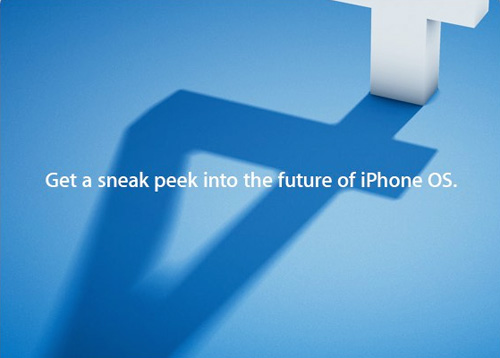
Just days after the launch of the Apple iPad . Apple has sent out an invitation to its press event at Apple Town hall. The event is set to take place April 8th 2010 . At the event apple will show us its 4.0 iPhone Os . Nothing else is know about the event yet but be sure The Gadget 411 will keep you updated.
Apple Today released Mac OS X 10.6.3, the latest update to Mac OS X Snow Leopard. The update is recommended for all users of Snow Leopard, and brings a number of fixes, improvements, and security patches. The update’s size may vary depending on the configuration of your Mac.
General operating system fixes and improvements provided for:
performance of Logic Pro 9 and Main Stage 2 when running in 64-bit mode.
printing reliability.
sleep and wake reliability when using Bonjour wake on demand.
a color issue in iMovie with HD content.
glowing, stuck, or dark pixels when viewing video from the iMac (Late 2009) built-in iSight camera.
an issue in which the Finder reports a -36 error when copying directories to a drive formatted as FAT32.
reliability of photo screen savers.
compatibility issues with OpenGL-based applications.
an issue in which shadows in PDF of Aperture book are black instead of gray.
an issue in which the microphone level in iChat may not increase the volume after reducing it to prevent a feedback event.
the reliability of certain third-party USB devices.
the Accounts preference pane can now limit login to members of groups hosted by a non-Apple directory service, such as Active Directory.
DNS server ordering as specified in Network Preferences and DNS reliability.
the reliability and compatibility of QuickTime X.
Data Collection: Mac OS X v10.6.3 can collect diagnostic and usage information from your Mac and send it to Apple for analysis automatically. The information is only collected with your explicit consent, and is submitted anonymously to Apple. For more details, see this article.
AirPort and wireless networking fixes for:
general reliability for wireless connections.
improvements to 802.1X reliability, including closed network connections , and WPA2.
sleep/wake reliability for current iMac models when connected to 2.4GHz wireless networks.
Date and Time fixes provided for:
Daylight Saving Time rules to reflect recent changes in areas including Argentina, Fiji, Pakistan, and Antarctica.
Directory Services fixes provided for:
an issue that could cause the system to become unstable or unresponsive when bound to an LDAP server using SSL.
an issue in which the 802.1X Loginwindow Profile is in place, but the wireless network is not available, directory authentication over Ethernet will now succeed.
File Services fixes provided for:
an issue that could prevent saving files from Microsoft Office 2008 to an SMB server volume.
issues copying, renaming or deleting files on an SMB server volume.
clear-text authentication enabling to an SMB file server.
iCal fixes provided for:
changing the invitation list for a single instance of a recurring event will no longer “un-book” the location of the meeting.
an issue in which new invitations on a Microsoft Exchange server might not appear in the Notification pane.
properly showing recurring Microsoft Exchange events which have a set end date. For details, see this article.
Mail fixes and improvements provided for:
an issue that causes background message colors to display incorrectly in Mail.
signing and encrypting messages, such as when using an Entrust PKI (Public Key Infrastructure).
synchronization of the “Sent” mailbox on a Microsoft Exchange server.
an issue that could cause Mail to delete mailboxes on a Microsoft Exchange server that is hosted behind an Internet load balancer.
Mobile Accounts fixes and improvements provided for:
home directory synchronization when the home directory is stored on an SMB file server.
properly warning mobile users in an Active Directory domain about upcoming password expiration.
creating a Mobile Account that uses smart card authentication, without using a command-line tool.
reliability in background synchronization.
MobileMe fixes and improvements provided for:
an issue in which movies could not be viewed in Safari when visiting www.me.com/gallery.
reliability of iDisk Sync.
reliability of syncing calendars.
Parental Control fixes and improvements provided for:
restoring Safari bookmarks functionality to parental controls users.
better handling of Safari bookmark management when using Parental Controls.
more reliable application launch restrictions when using Parental Control.
Rosetta fixes provided for:
an issue that prevented files with the # or & characters in their names from opening in Rosetta applications.
System Imaging fixes and improvements provided for:
the asr command, which now accepts the “–allow fragmented catalog” option, for restoring images that have a fragmented catalog file. For details, type man asr in Terminal.
the installer command, which can now be used to upgrade a Mac OS X v10.5 system with a QuickTime 7 Pro key installed to Mac OS X v10.6.
Time Machine fixes and improvements provided for:
reliability from Time Machine-to-Time Capsule backups, including multiple computers.
an issue with Time Machine in which system backups could be restored onto unsupported Mac configurations.
an issue in which a Time Machine backup might not work using an AirPort connection.
Xsan fixes and improvements provided for:
the reliability of Fibre channel connections to an Xserve RAID.
an issue that could cause the size of certain Fibre channel LUNs to be mis-reported.
Keep it to TheGaget411.com & also signup for our email updates. —>http://eepurl.com/jh9j
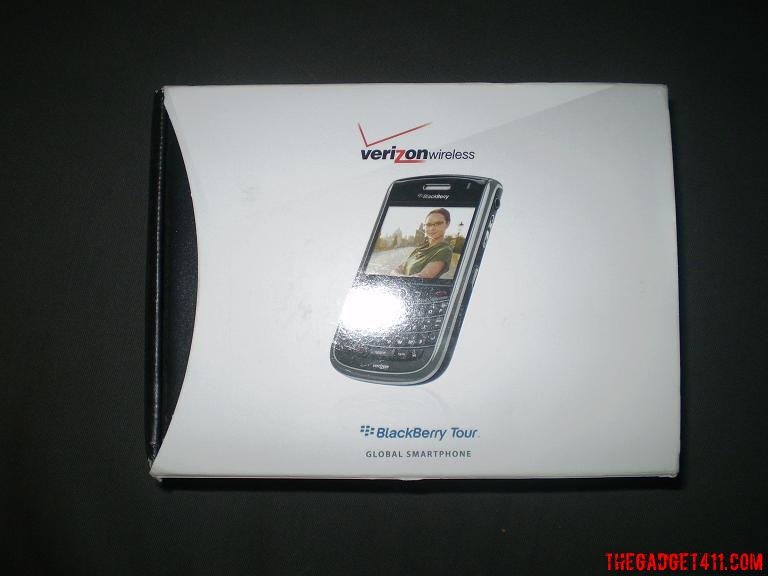
The great people at Verizon has Provided us with this one.
The RIM Blackberry Tour (9630) comes ready to use with 256mb of onboard memory with a upgradable Micro SD slot. With its 480 x 360 pixel screen it compliments the 3.2 megapixel camera/video well.
When taking this product out the box i was very surprised with the weight and how slim the phone was. The internet on this thing was amazing! Verizon 3g really does get the job done.Texting and Emailing couldnt have been easier,with the qwerty board, and the red message indicator light on the front.
The Scroll wheel on the front could not have made navigation on this easier.
On the the left side of the device is a customizeable button which is defaulted as Voice Dailing on the right side is volume up and down, and another customizable button which is defaulted as Camera. Also on the right side is a 3.5mm headphone jack for quick hookup with your favorite headphones.
For full details of this phone check out the verizon site . The blackberry 9630 tour comes in two models one with the camera , and one without, and is $269.99 with a 2 year contract. Check out the full specs, and photos below!
Size (L x W x D): 112 x 62 x 14.2 mm Weight: 130 grams Memory: 256 MB internal Flash memory Expandable Memory: microSD located under the battery door cover Battery: 1400 mAh removable/rechargeable cryptographic lithium cell Battery Life: TBD Keyboard: 35 key backlit QWERTY Display: High resolution HVGA 480×360 pixel Camera: 3.2 MP camera, flash auto focus GPS: Assisted, autonomous and simultaneous GPS enabled with preloaded BlackBerry Application for e911 capabilities Media Player: Video format support MPEG4; Audio format support MP3, AAC AAC+ etc Bluetooth: Bluetooth V2.0; mono/stereo headset, hands-free, PBAP Headset: 3.5mm stereo headset capable USB Port: Enables charging and high-spead data synchronization via USB “A†to micro USB “B†cable Network Support: Quad-band 850/900/1800/1900MHz
GSM/GPRS/EDGE networks
Single-band: 2100 MHz
UMTS/HSPA networks
Dual-Band: 800/1900 MHz
CDMA/EVDO Rev A networks
The pace at which Mozilla works can seem insane. It was less than a month ago when the the company released Firefox 3.5. Only three weeks later, Firefox posted screenshots of Firefox 3.7, which includes a change to the Tools bar and an Embracing Glass design.
But the ambition doesn’t end there. The Firefox team is looking even farther in the future: all the way to Firefox 4.0.
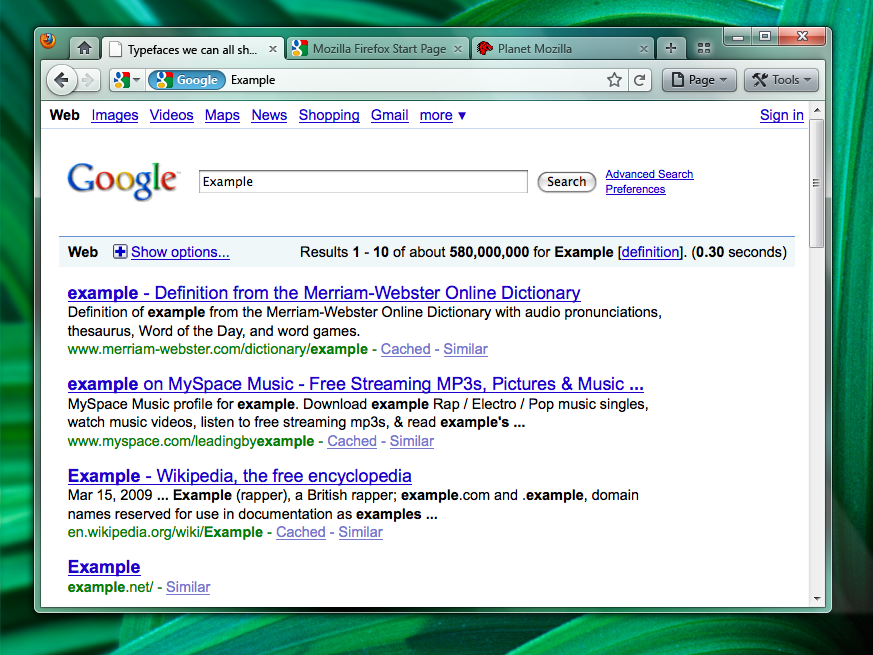
They’ve posted mockups of the new Firefox 4.0 design (included below) on their wiki. Firefox warns that they are just for brainstorming, but they provide the world’s first real glimpse into the next edition of the Firefox browser.
The Firefox Screenshots: Tabs on Top or Bottom?
These images, all of Firefox in the Windows OS, reveal that the company is struggling to choose between two primary designs: tabs-on-bottom and tabs-on-top. Tabs on bottom is the current norm in Firefox, while the tabs-on-top looks almost exactly like the Google ChromeGoogle Chrome browser. Here is the tabs-on-bottom version (click for full-sized versions):
And here’s the tabs-on-top design:
In addition, Mozilla summarizes the pros and cons of the two designs very succinctly:
Positives: – Save Vertical Space – Efficiency/Remove Visual Complexity – Right now the tabs have to be connected to something. So we are adding an extra visual element for them to connect to. – Shorter Mouse Distance to Page Controls
Negatives: – Breaks Consistency/Familiarity – Moving things confuses existing users. – Title is MIA – With the space removed from the titlebar you only get the truncated version in the tab. – Longer Mouse Distance to Tabs – Takes longer to mouse to a tab. – Lost Space – Sandwiched in between the application icon and the window widgets you lose some space.
While we won’t go into detail on the debate, we will say this: if Mozilla can offer the ability to choose between the two designs, it should. Some users need to get to the menu items faster, while others prefer having the tabs in closer proximity.
New Firefox 4.0 Feature: Combo Stop/Refresh/Go Button
Firefox 4.0 incorporates all of the design changes featured in Firefox 3.7 and includes a few new features. The big one is a Combo Stop/Refresh/Go Button.
Instead of separate buttons for each of these functions, they’re all integrated into one button on the right hand side of the address bar. It also changes colors based on your actions. So if you’re typing, it will be a green “Go†button, but if the page is currently loading, a red “Stop†button will take its place. Not a bad way to save space, if we do say so ourselves. Here’s a screenshot of the new feature in action:
Remember, this is all proposed, and feedback from the Firefox community shapes the browser into its final form. And you bet it’s going to get more great features, as it’s going to be some time until we can browse the web with this thing. But be sure to check out our sneak peek of Firefox in 2010 if you want to learn more.
The L.A. Times has reported that Apple will finally allow applications that use new augmented reality technology in the app store then their OS 3.1 update his iTunes in September. Â Augmented reality applications apply different types of media over a real time image using the iPhone 3GS’s camera. Â A great example of this new technology will be an app called TwittaRound, which will allow users to point their camera in a certain direction, geo-locate and visually position tweets sent from the app on the live image from the camera using the built in compass.
This is just one feature of the new iPhone 3.1 OS update. Â The update is said to contain many bug fixes and will be the first update since the release of the iPhone 3GS. Â Some new features that have been found in the beta include improved, “non destructive” video editing, vibrating icons when they are moved, and bluetooth voice control. Â Developers have also reported that the MMS icon has appeared in the new beta, and a select few have been able to successfully send and receive MMS messages. Â One of the problems that users have been talking about that has been said to have a solution in the new update is an overheating issue.
If you are a developer and have seen any other new features in the iPhone 3.1 OS beta, or if you have seen any other improvements or bug fixes, send me an e-mail at Dustin@thegadget411.com and let us know about it!
So it’s Apple’s Worldwide Developer’s Conference this week, and everyone is awaiting what the biiiig announcement will be, namely, new iPhones?
With the big 3.0 OS release being so comprehensive, it’s only natural that there are new iPhone models in the works. And the Palm Pre’s release date suspiciously moved to the weekend right before Apples WWDC? Come on. SOMETHING is up, right?
Well, here’s a roundup of what we would like and hope to hear at the conference concerning new iPhones and new iPhone models:
Most likely new iPhone features:
Faster processor.
More storage capacity.
Faster Internet speeds.
Video recording.
Better camera.
Digital compass.
More iPhone 3.0 software features, such as video editing, voice controls, laptop tethering, and potentially a new home screen that’s better designed for organizing and launching dozens of apps.
The phone will likely look very much like the current iPhone 3G. Some reports suggest a matte, rubbery back. But many “leaked” photos are fake. Then there’s a slew of other potential features, some of which Apple could unveil Monday, too, such as a front-facing camera for video chat, background app processing, or multi-colored iPhones. But those are relatively unlikely.
Just as important: What Apple announces regarding AT&T’s iPhone service plans. Specifically, if AT&T will offer some sort of entry-level iPhone plan that is less than $70/month, or if it will at least make its plans a better deal by including unlimited text messaging. (Sprint is doing this for the Palm Pre.) The iPhone itself is still too expensive for many buyers. And the service plan is, too.
And about pricing: It makes sense that Apple would keep its new, premium iPhones at the $199/$299 price levels. But it seems that a cheaper iPhone, perhaps will less storage or a few missing components, could show up for $99 or $149.
And other rumors swirling around the tubes include Video editing on the iPhone, a family of models so that you can find just the right size for you, FM transmittals so that you can transmit to other audio devices, Siruis, will ATT introduce tiered pricing?
And Steve Jobs is back on the scene. There must be good things to come, right?
Stay tuned, L$ will be peepin in on all the live blogging and will report back. fo’ sho’
It may have been St. Patty’s day but in the tech world, it was iPhone OS 3.0 day. Coming on the last day of South By Southwest’s Interactive week, Apple announced what would be included in their next iPhone update. The hype machine was in full effect in the days preceding this announcement. We knew that there would be some good stuff coming – we talked about MMS and tethering in the latest Money Shot, my homie Chris Pirillo wanted a search function, and Kevin Rose of Diggnation predicted cut n paste.
When it was all said and done, Apple touted over 100 features to be included in the update.
Here’s the Deets:
Cut Copy and Paste. W00t! Apple may have taken it’s time, but they definitely did it well – it works across all apps, and, in cute Apple fashion: you shake it to undo. Hee.
MMS! W00t W00t! Finally, you can send peeps pics via SMS. I guess I owe a lot of peeps pictures now. No more teasing them about phone cam pics I’d send them if they could get them. Also you can send contacts, audio and locations.
SMS services: now you can forward and delete your text messages.
Push Technology – get alerted by text, a little badge or by voice.
Spotlight: search. Just like on their computers, across all apps and even mail that’s still on the server.
Typing in landscape – across apps. Very Nice.
Bluetooth connectivity is beefed up. More functionality to connect to more hardware. Johnson and Johnson demoed LifeScan – a diabetes monitor and meal planner app. This is very interesting, and opens up the possibilities of the iPhone being utlized more in the medical field.
iphones will also be able to communicate to each other via peer-to-peer Bluetooth technology.
Maps and GPS – more support for turn-by-turn GPS when devs supply their own maps.
CalDAV- subscribe and share your calendar. Let everyone know what you are up to.
Stocks app – beefed up and can subscribe to news feeds.
Live video streaming from the web. ESPN did a dope demo streaming some March Madness games.
Shake to shuffle your songs.
Wi-Fi auto login.
Proxy support.
Parental Controls.
LDAP support.
Whew. That’s a lot of stuff. In sum, it’s a lot of stuff that frankly, most phones already do. Only Apple can create such fervor of gratitude for stuff that their products should have had in the first place. My favorite tweet from the coverage: @engadget “Applause for a feature that every other device in the world has. Odd.” haha. I found that quite the amusing.
Some fun things were also demoed – LiveFire – a First Person shooter, and Smule, creators of the Ocarina app brings on Dr. Ge Wang up from Stanford — he directed the Stanford laptop orchestra, to demo the new Trombone Leaf app. Will the iPhone be the next new musical instrument? Will it make being in the high school band cool? Marching Bluetooth Band.
Now you want it. Yes you do. When can you get it? Summer. Yes, now you have to wait. It’s free for the iPhone, and $10 for the ipod Touch. But if you are a dev, SDK is out and available now. Go Play. Let us know what you think!!
For some live blogging action from the announcement, hit up gdgt.com
Kevin Rose predicts that the iPhone update 3.0 WILL include cut and paste ability? The actual announcement of the OS update is not until tomorrow, but there have been some pretty juicy deets that have been circulating, and this is the latest. Peep the vid here.
Last week Microsoft released its latest update to the Zune software. Version 3.1 brings us Checkers, Space Battle, and that extremely addicting game Sudoku. Along with the update to the games list, came some behind the scenes work to help fix reliability of the Zune software. This update came as a surprise as the 3.0 update had only just come out two months before, and so far the updates to the software have been separated by months at a time. Along with the update to the software came an update to the Zune Pass. Now along with your unlimited access to the Zune library, you also receive a monthly credit for ten free songs. On the official blog for the Zune, Cesar Menendez from Microsoft lists some answers to some common questions about the ten free songs, but as you read this you quickly learn that as can be expected there is a catch. There is no rollover, so you better make sure to use all ten credits as soon as you can, because they also don’t tell you exactly when your ten credits will refresh monthly. The blog post also states that almost 90% of the Marketplace Library is in MP3 format, which is nowhere near the truth, as of a week after the update only about two-thirds of the library is in MP3 format, and most of the more mainstream music is still in WMA. While I think there is some fine tuning that needs to be done to this deal I do think this is definitely a major improvement for the Zune pass.