Archive | November, 2008

Zune 3.1 and a Zune Pass upgrade

Last week Microsoft released its latest update to the Zune software. Version 3.1 brings us Checkers, Space Battle, and that extremely addicting game Sudoku. Along with the update to the games list, came some behind the scenes work to help fix reliability of the Zune software. This update came as a surprise as the 3.0 update had only just come out two months before, and so far the updates to the software have been separated by months at a time. Along with the update to the software came an update to the Zune Pass. Now along with your unlimited access to the Zune library, you also receive a monthly credit for ten free songs. On the official blog for the Zune, Cesar Menendez from Microsoft lists some answers to some common questions about the ten free songs, but as you read this you quickly learn that as can be expected there is a catch. There is no rollover, so you better make sure to use all ten credits as soon as you can, because they also don’t tell you exactly when your ten credits will refresh monthly. The blog post also states that almost 90% of the Marketplace Library is in MP3 format, which is nowhere near the truth, as of a week after the update only about two-thirds of the library is in MP3 format, and most of the more mainstream music is still in WMA. While I think there is some fine tuning that needs to be done to this deal I do think this is definitely a major improvement for the Zune pass.
Popularity: 1% [?]

Posted in UncategorizedView Comments

ASUS releases P565 PDA

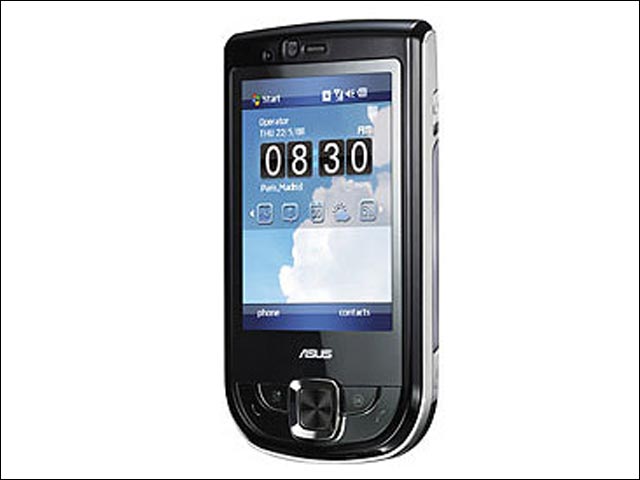
ASUS has introduced the ASUS P565, a business PDA phone that boasts an 800 MHz processor. Featuring ASUS’ latest touch-driven user interface called Glide UI, the P565 comes with a 2.8″ touchscreen running at a high resolution of 480 x 640 pixels, 3 megapixel camera, built in GPS, WiFi and support HSDPA data connection. The fast processor renders the P565 particularly amenable to multitasking, while Glide enables users to switch between tasks rapidly with their fingertips. The P565 also comes with a potent suite of business-oriented features and software, including push mail, business card recognition and Microsoft Office Mobile. Other useful applications such as Anytime Launcher and Multi-Home enable users to view their calendars, the times of local and visiting cities, weather reports, online news and much more-all with an intuitive tap, slide or flick of their fingers

Popularity: 1% [?]

Posted in UncategorizedView Comments

Vlingo For Blackberrys

Now you can talk to your phone and it understands you.

Send a friend a text message without typing. Just speak, verify and send. Or find stuff. Say, for example, “pizza places in Pittsburgh.” Your phone figures out what you want, finds it and shows you how to get there. No tapping, no thumbs, just good old speaking.

It’s all possible with technology by vlingo — a revolutionary software that translates your voice into text like nothing before.

Vlingo has recently voice-enabled the Yahoo! oneSearchâ„¢ application. Search for anything you need on your mobile device. It’s fast & easy! Yahoo! oneSearchâ„¢ with voice is available on the BlackBerry Pearl, BlackBerry Curve and the BlackBerry 8800 series.

Check out http://www.Vlingo.com

Thanks to my friend  Mike @ Mikeniles.net for this one! Continue Reading

Popularity: 1% [?]

Posted in UncategorizedView Comments

AT&T’s Samsung Eternity (SGH-a867)full interaction, total entertainment

Now in Stores!

At first glance to me, It looks like Googles G1

Here is the info from Samsungs Site

The SAMSUNG Eternity™ isn’t just a phone; it’s the total package. It’s a full touch screen full of entertaining features. And it takes full advantage of 3G high-speed technology. You get AT&T Mobile Music, AT&T Mobile TV, a 3.0 megapixel camera, GPS and so much more. With all that entertainment, and 200MB of built-in memory, you’ll be able to enjoy this SAMSUNG for an eternity.

Continue Reading

Popularity: 1% [?]

Posted in NewsView Comments

Storm Release date

After much of rumors and leaked info, Verizon Wireless today said that it will start selling the BlackBerry Storm on November 21st to all consumers and corporate customers. The price of the touch screen phone will start from $199.99, which required a 2-year service contract and after a $50 MIR.

Thanks to Slashphone

Popularity: 1% [?]

Posted in UncategorizedView Comments

Dell releases new Mini 12

The Inspiron Mini 12 is less than 1.1″ thick and under 3 pounds

12.1″ display
Advanced wireless options to keep you on the go
Dynamic & Customizable user interface
Extended battery life with 6 cell battery option

Stay connected to your world virtually wherever you go. Inspiron Mini 12’s small,incredibly light design lets you travel light while keeping up with your blog, video chat, instant messenger and email so that you never lose touch with your family and friends.
Connected by Design

The Dell Inspiron Mini 12 was developed from the ground up to be the perfect companion,keeping you connected while on-the-go.

Continue Reading

Popularity: 1% [?]

Posted in NewsView Comments

Drobo with FireWire 800

Drobo!!! I am a huge fan of storage. I attribute that mostly to the fact that I don’t delete ANYTHING. Who does? Our digital lives are just a collection of files and folders. The Drobo finally gives us an easy to use solution for home users. How often do you see statements like “Hot-expandability” and “16 TB” in a consumer product? By my count… never.

The folks at Data Robotics Inc. have recognized that users need the same flexibility and usability in a product as the huge corporations out there. They have also done a very good job at wrapping it all up into a very nice little package.

This new unit can be expanded to 16 TB and has Firewire 400 and 800 on board. It also has USB 2.0 for those of you who purchased the new MacBook. The price seems to be around $500.00 everywhere. Since it is Windows and Mac compatible the price may be the only dissuading factor.

Go to http://tinyurl.com/5qmcvz for more details on this product and as always please leave some comments to let us know how we are doing.

Popularity: 2% [?]

Posted in DesktopsView Comments

MacAlly BTKeyMini Apple iPhone Keyboard

If iPhone virtual QWERTY keyboard is not satisfied you on long email typing,AValive has put up an external keyboard called BTKeyMini Apple iPhone Keyboard on its pre-order page. Selling at 92 USD, the BTKeyMini is made by MacAlly and will connect to your iPhone via wireless bluetooth connection. It is not sure if this keyboard is ready for shipping, it is not even listed on MacAlly product list yet.

Thanks to Slashphone for this.

Popularity: 2% [?]

Posted in NewsView Comments

OneLook.com

We all find ourselves looking for the definition of a word. If you are like me you pull up Google and type the word and hit enter. You can normally find a definition in there somewhere that will work. There is also Wiktionary which is a fine site. The site under the microscope today is http://onelook.com/. What makes this site special is not the number of words it contains but the sources that it is pulling from. These are ‘official’ definitions. That may not mean much to those of us that remember a word at 2:00 in the morning and just want to know what it means so that we can go back to bed, but if you are in school or are doing something that requires absolute to the letter accuracy this could be very important.

Aside from all of the definitions you will also see a few additional features. One of which is the ‘Word of the Day’ on the home page. This is a feature for all of the curious word nerds out there. It may just teach you something. The second special feature that this site boasts is what they call the ‘Reverse Dictionary’. This is in Beta right now but the concept is pretty interesting. You can type in a concept and it will return some words that match. I decided to get in on the fun so I typed in “Has the same meaning as” and received a huge list of words. They all seemed to have a relation to the word same but it was not really helpful. I then decided to reduce the number of words in my search to “same meaning”. That still created a healthy list of items but it was paired down. It was then easier to pick out the words in the list like ‘synonym’ and ‘even’ and ‘equal’. Any of these could be what I was looking for if I had a reason to need a word in the first place. You can click on any of these words and get the full definition. This feature is far from perfect but it is an interesting idea. You also have the ability to browse the different dictionaries and customize some of the esthetics of the site.

In a haze if online dictionary sites this one has some real promise. Check it out and leave a comment with your experience.

J.R. Bye

Popularity: 1% [?]

Posted in Website ReviewsView Comments

Invisible Shield for iPhone 3G by ZAGG

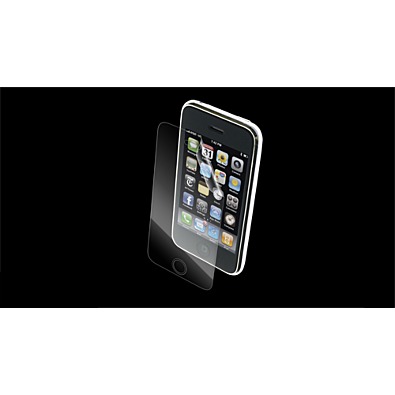
Many accessories popped up for the iPhone 3G after its release. There are battery extenders and dongles and adapters, but sadly there is nothing to reduce the cost. There are, however, some accessories that will help you protect that investment. If you are like me you do not want to wrap that status symbol, ahem, device… in a full case. It loses all of its cool, right? Well there is an accessory for the vanity in all of all of us. The Invisible Shield by Zagg. Cool factor aside, this product offers some pretty hard core protection. You can get just the screen protector or wrap the entire device with two pieces. Go to http://tinyurl.com/5rj6yq and watch the demonstration video. It shows off how scratch proof the wrap really is. The application is more akin to putting aftermarket tint on your car window than the usual stick it on and hope it lines up. They include an application spray that you spray on your fingers and on the device. You then put the designated piece on the device and adjust it. Once you have it exactly where you want you use the supplied squeegee card to smooth out the bubbles and drive all of the fluid out from under the shield. This makes it much easier to line everything up.

One negative is the feel. The iPhone is all about the touch. Everything meaningful that you do with this device is via the touch interface. This makes the feel of the device very important. This cover has a more rubbery feel. It makes your finger drag a bit more when you are performing any gesture that includes a swipe or controlled drag. This can make it feel like you have to push a little harder to get the desired effect. I found it a bit clunky at first but after about a week I was able to get used to it. It is a personal preference really. You have to decide if protecting the device is important enough to you to possible change the user experience. For me it was worth it.

The cost. This is expensive compared to the other covers on the market. You can get 10 of another shield for the price of one full InvisibleShield. This is largely because you need to change the other covers more to keep the same level of performance. You can skimp on some of the other flashy accessories but the investment in the iPhone warrants some protection. If you want the best protection you will have to pay for it. After all it is equivalent to purchasing a few dozen flashlight apps or tip calculators from the Apple App Store right?

If you are giving iPhone protection some thought take a look at this product.

http://www.zagg.com/

Front Cover: $14.95
Back Cover: $18.95
Full Cover: $24.95
J.R. Bye

Popularity: 3% [?]

Posted in Cell PhonesView Comments

Sign Up For Tech Updates!
* indicates required

Powered by MailChimp