Tag Archive | "twitter"

Twitter Rolls Out “Promoted Tweets”

Twitter Rolls Out “Promoted Tweets”

From day 1, Twitter’s “business model” was split up into two parts: 1) Create a service everyone wants to use. With over 50 million registered users, I would say that part one has been fulfilled. 2) Figure out a way to make money from this service. Starting today, the wheels for fulfilling that goal have been put in motion.

Known as “Promoted Tweets”, this will be Twitter’s foray into actually making money. Since its beginning, Twitter and it’s co-founder Biz Stone have looked into different ways of monetizing the service, without pissing off its users. The model unveiled today, will follow Google’s highly successful ad model: insert ads at the top of the search results page that are related to the term being searched.

As described by Twitter:

“You will start to see Tweets promoted by our partner advertisers called out at the top of some Twitter.com search results pages. We strongly believe that Promoted Tweets should be useful to you. We’ll attempt to measure whether the Tweets resonate with users and stop showing Promoted Tweets that don’t resonate. Promoted Tweets will be clearly labeled as “promoted” when an advertiser is paying, but in every other respect they will first exist as regular Tweets and will be organically sent to the timelines of those who follow a brand.”

The first guinea pigs in Twitter’ first foray into actually turning profit (they hope) will be Best Buy, Virgin America, Red Bull, Sony Pictures, Bravo, and Starbucks Coffee.

I’ll admit it, I don’t really care much for Twitter. There, it’s out in the open. I have an account, I’ve tweeted a little bit (most of which are just automatic when I put up a new blog post), but I still haven’t found a need/use for it in my life. The times I use it most is when it’s to participate in some sort of contest. When I first got an account I was able to connect with fellow social media enthusiasts, but that kind of tapered off.

Since I am not a hardcore Twitterer, I can’t say for sure how this will impact Twitterers as a whole. But who said I can’t speculate?

As it stands now, these ads will only show up when you search for a specific term, a la’ Google Search. Over time, according to the Wall Street Journal, these ads may make their way into the stream users see when they log in to the site, which means they will even see the ads if they are using a third party app (Tweetie, Tweetdeck, Twidroid, etc.). Also, these ads will only be seen by 2% to 10% of Twitter users in the first few days of its initial rollout. So initially, I think these ads will not be intrusive or annoying at all. When they begin to roll out into the general tweet stream, that may be another story. Though many of these third-party applications have ways of filtering out tweets from the stream, so if you find them a pain in the ass, you can just get rid of them (essentially). Will Twitter know if the ads are being filtered? Even more, will they know if specific ads are being filtered?

Well that is why Twitter has built a set of rubrics for ads they call “resonance”. If an ad is performing poorly (doesn’t work, isn’t click/viewed/shared often), Twitter will notify the advertiser and pull the ad. This will benefit both the advertiser and the user.

How will Twitter decided which ads to incorporate into your stream? Whether it be based on geographic location (somewhat easy to do, considering most of twittering is done from mobile phone, the majority of which nowadays has built-in GPS chips), tweet history, or the types of people you follow, that is a question for a little bit down the road.

Popularity: 1% [?]

Posted in NewsComments (0)

Google Does Social Networking? (Video)

Google Does Social Networking? (Video)

If watched the video above you would know a little something about google new tool BUZZ.

Google Buzz seems it was ment to take out the social networking world , such as Twitter / Facebook,  but i think its going to need some major work.  There is nothing special about google buzz that you cant do with Twitter and/or Facebook.

We are just going to have to see where this one goes google.

http://www.google.com/buzz


Popularity: 1% [?]

Posted in Website ReviewsComments (0)

Phone calling coming to Twitter

Phone calling coming to Twitter

Picture_3Twitter users on Thursday will, for the first time, be able to make voice calls directly to each other through the microblogging service.
A new third-party offering from Jajah known as Jajah@call is expected to go into beta Thursday morning that will allow Twitter users to initiate a two-way voice chat with other users by typing “@call @username”–where “username” is someone’s Twitter ID–into any Twitter client. During the beta period, the company said, the calls will be limited to two minutes, but the company will evaluate that length during beta. However, it sees the two minute period–after which the call will end–as “the verbal equivalent of a tweet.”

According to Jajah, an Internet communications provider with tens of millions of users, the service will allow a user to place a call to any other user, so long as the second person follows the first on Twitter and both have Jajah accounts. The service is free to use and is expected to work on any Twitter-enabled device, from PCs to smart phones.

One important element of the service is that users can keep their phone numbers private, yet be able to have voice chats with just about anyone on Twitter. To be sure, since the calls are initiated by one person, the recipient may well not be online, or may choose to ignore the call if they don’t want to talk.

There are currently several applications that allow users to create voice-to-text Twitter posts–known as tweets–but it does not appear that anyone has yet made it possible to initiate voice communications directly between Twitter users.

Coming on the heels of the announcement earlier this week that Facebook users will now be able to communicate with each other via voice–using a third-party application from Vivox–it’s clear that there is a strong interest, among service providers, at least, in taking leading social networks beyond strictly text communications. Whether large numbers of users choose to get on board is unknown at this point, of course. And given that neither the Facebook nor the Twitter voice services are being provided by the social networks themselves means that some users will choose not to get involved for fear of privacy, stability or other concerns.

Still, if these third-party services end up being successful, it would be natural to expect that Facebook and Twitter may decide they need to step up and directly embed such technologies into their offerings. And there is a precedent for such a move. After Vivox began offering Second Life users a third-party voice solution, the virtual world’s publisher, Linden Lab, decided it needed to take advantage of the technology. Today, thanks to a formal partnership, Vivox’s voice service is formally integrated into Second Life.

And while it may be some time before such a thing happens with either Facebook or Twitter, or any other major social network, one would have to think that it’s only a matter of time.

Via our friends over @ CNET

Popularity: 8% [?]

Posted in Website ReviewsComments (2)

Sonos lets you flood the Twitterverse with Tweets about what you’re listening to

Sonos lets you flood the Twitterverse with Tweets about what you’re listening to

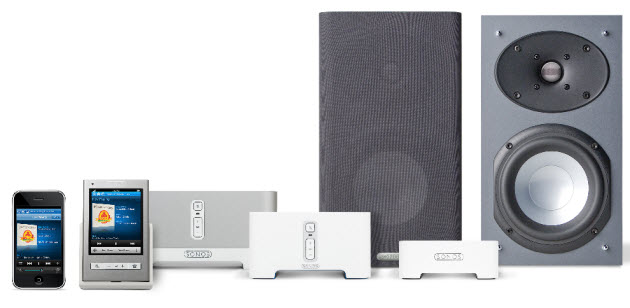
sonosWireless music system vendor Sonos is announcing today that it has integrated Twitter into its multiroom boom boxes so that you can Tweet about the songs you’re listening to.

The company is beta testing its new Sonos System Software 3.1, which includes the Twitter integration, and expects it to be available to all Sonos users later in the fall at no charge. If users really feel the need to Tweet what they’re listening to at any given moment, then a bunch of consumer electronics companies are going to have to give their product lines a makeover. More likely, this is going to appeal only to the Twitterati for now.

Twitter integration is coming to the Sonos Controller 200, Sonos Controller for the iPhone and Sonos Controller for the Mac and PC. With one click, users can post the name and artists of the track they’re listening to on their Twitter feed. They can also edit the contents and add any personal message to the Tweet.

Via [venture beat]

Popularity: 1% [?]

Posted in Home EntertainmentComments (0)

Tr.im Url Shorting Services Shuts Down!

Tr.im Url Shorting Services Shuts Down!

logo_homeAs Of Sunday August 10th the URL shorting service tr.im will no longer make URLs  short.

Posted on site (Tr.im):

tr.im is now in the process of discontinuing service, effective immediately.

Statistics can no longer be considered reliable, or reliably available going forward.
However, all tr.im links will continue to redirect, and will do so until at least December 31, 2009.
Your tweets with tr.im URLs in them will not be affected.

We regret that it came to this, but all of our efforts to avoid it failed.
No business we approached wanted to purchase tr.im for even a minor amount.

There is no way for us to monetize URL shortening — users won’t pay for it — and we just can’t
justify further development since Twitter has all but annointed bit.ly the market winner.
There is simply no point for us to continue operating tr.im, and pay for its upkeep.

We apologize for the disruption and inconvenience this may cause you.

Popularity: 2% [?]

Posted in Website ReviewsComments (3)

Flickr2Twitter Services Released

Flickr2Twitter Services Released

flickblog_logo

Flickr has just released their long awaited feature for posting photos to Twitter. It’s been in beta over the past few weeks, but now it’s live for everyone.

It’s not exactly like other photo tweeting services like TwitPic (Twitpic), which lets you sign-in using your Twitter account. To use Flickr2Twitter, you first need to sign-in to Flickr, and then authorize the service to post to your Twitter account, which can be done from your settings page.

Then, you’ll be able to use the “Blog This” button that accompanies each photo to post it to Twitter, along with a customized tweet. Like an increasing number of other services, Flickr2Twitter uses its own URL shortener: flic.kr.

You’ll also be able to use Flickr2Twitter from your mobile, with a new custom email address that’s generated once you authorize Twitter posting. The new address is the same as your old one, but appends a “2twitter” to the alias. Just send a photo from your phone to this address and your photo will be posted both to Flickr (Flickr) and Twitter (Twitter).

Essentially, this is TwitPic for existing Flickr users. TwitPic offers a lower barrier to entry for people who use Twitter but not Flickr, but for Flickr users, the experience of cross-posting photos to Twitter is now a breeze. And since there are millions of Flickr users, get ready for lots of flic.kr photos in your Twitter stream.

Thanks To Mashable for this one!

Popularity: 1% [?]

Posted in Website ReviewsComments (0)

It’s the Twitter Client Ultimate Fighting Championships. TweetDeck and Seesmic Both Launch Major Updates

Welcome to the Twitter Client UFC Octagon!
TweetDeck and Seesmic go head to head with huge updates to their desktop clients… and TweetDeck has a pretty sweet finishing move.
Earlier today, I got an email from Seesmic announcing their upgrade. The Deets from the email,  .:commentary:. by LizMoney:

Multi-Account Posting with Smart Account Enabling:
We’ve upgraded the user interface to select which accounts to send posts to, saving you the time and effort it takes to post to each account separately. We’ve also added an option for Smart Account Enabling. With this feature turned on, this will allow Seesmic Desktop to change accounts when messaging your friends based on whom you are replying or direct messaging to. Seesmic will not change the accounts if you do not enable Smart Account.
.:Ooh I like the Smart Account feature. If you are managing other people’s tweets, there’s no danger of mis-tweeting:.

Authenticated bit. ly Integration:
You can now use your own bit. ly account when using bit. ly as a shortener for Seesmic Desktop. By simply entering your bit. ly API key, you can now keep track of your URL clicks when sharing your links with your friends and followers.
.:Nice. This way, you can track your link stats and see how much your bit.ly link is clicked:.

New Services Panel:
Along with bit. ly, we have set a foundation for managing your accounts for sending images, and be able to set them in our new Services Panel. The Additional Integrated Account Services panel currently includes image services such as Pikchur (where you can set your own account), Posterous, TwitPic, Twitgoo & yfrog (which is currently using your twitter account).
.:Integration. Put your Tweet out on blast on other services right from inside Seesmic:.

You can also watch a demo video here

TweetDeck, the defending champion in Twitter clients comes back with a Super Combo. It’s not just upgrading, but it’s ReLaunching it’s desktop application and has the finishing move – TweetDeck for the iPhone. Available Today at 9pm PT. This is awesome…because, after using Tweetdeck, whenever I’m on mobile, I miss my groups and columns.
Here’s the deets for the iPhone App, from Mashable:

- Column based friend groups (like TweetDeck desktop)
- TweetDeck desktop syncing (make a change on the iphone and it’s reflected back on the PC)
- Facebook toolbar like status updates
- Multiple account support
- Flicking to move between columns
- Shake to refresh

**Ha-Du-Ken** That’s awesome.
ooh Tweetie, better watch your back. TweetDeck for the iPhone just challenged Tweetie to a streetfight.

So the Deets on the TweetDeck updates ReLaunch via Mashable, .:commentary:. by LizMoney:

TweetDeck will support mobile-to-desktop sync. This means whenever you make a change on TweetDeck (i.e. change friend groups or columns), it will automatically update on your iPhone and vice-versa, multiple accounts and unlimited columns.
**Shori-yuken!**

“Block and Report Spam” button: Clicking on this button will not only delete the spam message, but it will block that specific user and report them to Twitter. Simply brilliant.
.:Word! All those Britney sucking on various things accounts? Gone and reported!:.

“Reply All” feature:
You can now tweet to everyone who is mentioned in a specific tweet.
.:Yes! I’ve been dying for this. Often there are more than just one person involved in a conversation that I want to reply all to:.

“TweetDeck Recommends” column: Just as it sounds, it’s a column with a list of recommended people to follow.
.:As Borat would say: Verrry nice. A great way to get genuine follwers and add value to your tweetstream :.

Deeper video playback support: Qik, 12seconds, and other video clips are fully supported in TweetDeck.
.:Just in time for that iPhone 3G S video capability:.

Auto-suggest filter: When you start typing someone’s username, it will find the person and allow you to add them to a group quickly.
.:Sweet. Group your peeps on the fly:.

Integration with YFrog for photo sharing.

RE (In reference to): A new menu feature that allows you to reference a specific user or a tweet in your own message.
.:I like this. Because you might miss an @ to you, or want to reply to someone’s tweet who is scrolling fast. It facilitates connections and conversations:.

Are you ready to rumble?! Both applications are busting out with great improvements and upgrades, not to mention throwing down on the iPhone front.
But they are not alone. PeopleBrowsr is a social media addict’s dream. Imagine TweetDeck on steroids. With ADHD. It multitasks with almost every single Social Media site out there and you can customize it like woah. It’s so feature rich, I have been using it for a few weeks and still haven’t gotten to everything that it can do.

Also,  I’m pushing beta on Mixero, which is on the other end of PeopleBrowsr, as it’s motto is “Reduce the Noise” it’s clean, great for only picking out what you want to see, when you want to see it. It will slim down your twitterstream to just what you want to see. It’s awesome for when you want to track a certain trend (I used it for tracking #E3 and #WWDC streams), or just certain groups, and it’s minimize-to-avatars when it’s not in focus is my favorite feature. Mixero’s got an iPhone app in the works too. It’s definitely one to watch. You can follow @Mixero and @Peoplebrowsr for latest news and updates on these apps. They’ll answer any of your questions too, they are super responsive.

So who will win the Twitter client Kumite? What is your favorite Twitter Client? Let me know! @LizMoney on Twitter, leave a comment, I want to hear from you!

Popularity: 2% [?]

Posted in NewsComments (4)


FIND US!

Tech News