Tag Archive | "Palm"

HP TouchPad Brings webOS to the Big Screen

HP TouchPad Brings webOS to the Big Screen

HP today enlarged the HP webOS world with the first webOS slate – the HP TouchPad – the breakthrough webOS user interface fully realized in the tablet experience.

With its vibrant 9.7-inch diagonal flush capacitive multitouch display, virtual keyboard, instant-on access, support for Adobe Flash Player 10.1 beta in the browser and access to thousands of webOS applications,TouchPad works the way you do and is designed not just for fun but for mobile productivity. It’s ideal for anyone who wants the benefits of the amazing webOS platform on a much bigger scale.

TouchPad is one of the products HP announced today to introduce a unique experience for customers around connected mobility, offering a unified experience for the first time across a variety of devices. It’s one of the building blocks in HP’s vision to seamlessly connect all your worlds through the power of HP webOS.

“Today we’re embarking on a new era of webOS with the goal of linking a wide family of HP products through the best mobile experience available,” said Jon Rubinstein, senior vice president and general manager, Palm Global Business Unit, HP. “The flexibility of the webOS platform makes it ideal for creating a range of innovative devices that work together to keep you better connected to your world.”

Designed to be used alone or as a digital companion to your webOS phone, TouchPad connects you and your devices through the elegant webOS experience. Never miss an important call or SMS message – they can be answered and viewed right on your TouchPad. Plus, HP’s exclusive new touch-to-share feature will let you simply touch an enabled webOS phone to your TouchPad to share web URLs.

With the HP Synergy feature, you simply have to sign in to your Facebook, Google, Microsoft Exchange, LinkedIn and Yahoo! accounts and your contacts, calendar and email automatically populate your TouchPad.

TouchPad works the way you do
The TouchPad user interface is a visual representation of your workspace, so you can manage your workflow in a naturally intuitive way that’s easy and fun. The power of webOS true multitasking lets you have multiple applications running at the same time. webOS shows you your activities in the form of cards, not a sea of application icons on numerous home screens.

This helps you do all the things you want to do, all at once, so you can listen to music, update your status on Facebook, read email and chat on IM at the same time. As you launch new activities, webOS will automatically group related cards – for example, an email and an associated web page – together in a card stack, so you can easily track all related items together.

TouchPad also features a webOS communication suite powered by HP Synergy that keeps you connected and creative, making all of your communications simpler, richer and in your control. It’s a complete solution, including email, instant messaging, contacts, calendar, videos and a front-facing camera for video calling. Connected photo albums make it easy to share and view your pictures directly from popular services such as Facebook, Snapfish and Photobucket. It works seamlessly with TouchPad’s user interface for a natural and efficient experience.

Around the house or on the go
TouchPad offers a great internet experience around the house or on the go, so you can manage your busy life, be productive wherever you are and stay connected with work, friends, family and social networks. It keeps you connected anywhere there’s Wi-Fi for easy access to the web and entertainment.(8)

At home, whether you’re watching TV, relaxing on the sofa, at the kitchen table or in bed, you can check in with friends, surf the web, play games or read a book, magazine or newspaper. Amazon.com today announced that it will launch a free Kindle app for HP webOS tailored for TouchPad that will give you access to more than 810,000 titles from Amazon’s Kindle Store. You also can subscribe to popular magazine titles, such as Time, Sports Illustrated, Fortune and People, and download movies and TV shows through the HP Movie Store. The TouchPad music app lets you transfer and play all your favorites from your personal music collection,(9) with amazing sound quality by Beats Audio. You can start an email, create a message, update your status, search your favorite websites – all before you’ve even opened an application. Whenever you want to do something on your TouchPad, Just Type.

Buy and sell on Amazon.com, do your banking, buy movie tickets from Fandango or check the news. Whether your thing is Facebook, YouTube, Twitter, IM, video calling or email, TouchPad brings it all together with thousands of available webOS applications and the convenience and power of HP Synergy for integrated contacts and calendar to keep your busy life on track.

It’s great for road trips, on a plane, while commuting, in public places, while visiting friends and on vacation. It’s easy to pack, has a long-lasting battery and integrated GPS (3G only), and posting vacation photos is a snap.

Mobile productivity
When productivity is key, TouchPad makes an excellent companion. You can read and write email, view your work and personal inboxes together, or easily toggle between them. Integrated messaging conveniently combines all your text messages, picture messages and IM conversations with one person into a single view, and you can connect through SMS, Google Talk, AIM and Yahoo! Messenger.

TouchPad’s virtual full QWERTY keyboard includes a number row, which reduces keyboard switching, making typing easy and fast. It powers on instantly and brings you back to exactly where you left off, whether you were in the middle of composing an email, playing a game or browsing a web page. With webOS true multitasking, it’s like you never left.

For maximum productivity, HP is working with Quickoffice to include the Quickoffice Connect Mobile Suite, which lets you view and edit documents, such as Microsoft Word and Excel. It also comes with VPN support to connect to corporate networks.

With its 1.3-megapixel front-facing webcam, TouchPad offers video calling capability. It’s also compatible with HP’s industry-leading printing solutions, so you can wirelessly print documents, photos and emails to compatible wireless and networked HP printers.

TouchPad has built-in HP Touchstone technology for easy charging, so it’s compatible out of the box with the HP Touchstone for TouchPad (sold separately), and you can charge in either portrait or landscape mode, even without removing the TouchPad case (sold separately). The webOS Exhibition feature lets you run applications designed specifically for Touchstone. Set your TouchPad on Touchstone and Exhibition launches automatically, showing you anything from today’s agenda to a slideshow of your photos.

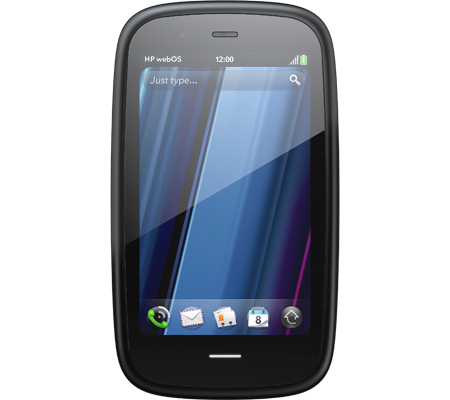
TouchPad is one of three webOS products announced today (see separate announcements for HP Veer and HP Pre3). Each product plays a distinct role in the growing webOS family, designed to meet the varying needs of customers in a rapidly evolving mobile landscape.

Availability
HP TouchPad is scheduled to be available in the summer. Exact pricing and availability will be announced at a later date.

HP TouchPad features and specs

  • HP webOS
  • High-speed connectivity
  • Qualcomm Snapdragon dual-CPU APQ8060 1.2-GHz processor
  • 9.7-inch diagonal XGA capacitive, multitouch screen with a vibrant, 18-bit color, 1,024 x 768 resolution display
  • The option of either 16 GB or 32 GB of internal storage
  • High-performance browser with full access to the web, including support for Adobe Flash Player 10.1 beta for access to rich, Flash-based web content
  • Wireless connectivity:
    • Wi-Fi 802.11b/g/n with WPA, WPA2, WEP, 802.1X authentication
    • A-GPS (3G only)
    • Bluetooth® wireless technology 2.1 + EDR with A2DP stereo Bluetooth support
  • Multimedia options, including music, photos, video recording and playback, and a 3.5 mm headset/headphone/microphone jack
    • Internal stereo speakers and Beats Audio
    • Front-facing 1.3-megapixel webcam for live video calling
  • Email, including EAS (for access to corporate Microsoft Exchange servers) and personal email support (Google Gmail push, Yahoo!, POP3, IMAP)(6)
  • Robust messaging support
  • Light sensor, accelerometer, compass (magnetometer) and gyroscope
  • Rechargeable 6,300 mAh (typical) battery
  • Micro-USB (Charging and PC Connect) with USB 2.0 Hi-Speed
  • Built-in HP Touchstone technology for easy charging (HP Touchstone for TouchPad sold separately) and HP touch-to-share to share web addresses between TouchPad and compatible webOS phones
  • Dimensions: 190 mm x 242 mm x 13.7 mm (7.48 inches x 9.53 inches x .54 inches)
  • Weight: approximately 740 g (1.6 pounds)

More information about HP TouchPad is available at www.palm.com/TouchPad.

HP-TouchPad-Back

Picture 1 of 7

Popularity: 4% [?]

Posted in TabletsComments (0)

HP Pre3

HP Pre3

For professionals who require powerful mobile productivity with an eye on personal connectivity, HP today announced the versatile HP Pre3 smartphone running HP webOS.

With a large 3.58-inch touchscreen, fast 1.4-GHz processor and a full slide-out keyboard, Pre3 is a multitasking professional workhorse that’s perfectly balanced for speed and serious fun.

Pre3 is one of the products HP announced today to introduce a unique experience for customers around connected mobility. It’s one of the building blocks in HP’s vision to seamlessly connect all your worlds through the power of HP webOS.

“In the suite of webOS products we’re introducing today, Pre3 is our premier phone, designed for the speed of business,” said Jon Rubinstein, senior vice president and general manager, Palm Global Business Unit, HP. “It enables professionals to accomplish more of their important workday tasks while easily keeping their fingers on the pulse of their personal lives.”

Pre3 is the ideal smartphone for multitasking professionals who rely on advanced messaging and voice capabilities to stay connected with all aspects of their busy lives.(1) With a slim design and high-capacity battery,(2) it is comfortable to carry and use all day. The phone’s fast performance and large, high-resolution display accentuate the unique webOS experience for both professional and personal use.

The portrait layout enables optimal readability for email, attachments and web, and the new vertical slide-out keyboard – the widest and largest keyboard on any webOS phone to date – helps ensure quick and comfortable error-free typing. It’s ideal for heavy email and messaging needs, web browsing, enjoying multimedia and for staying in touch with business and social circles.(1,3)

For professionals who demand more than productivity With an array of features that are critical for professionals balancing work and personal use – including the speed of 3G and Wi-Fi,(1) a comfortable keyboard for typing and a large vivid touchscreen – Pre3 offers the best of both worlds on the powerful HP webOS platform:

  • Business-class email – Pre3 offers business-class email and encrypted data storage to protect critical information and supports industry-standard VPN to connect to corporate networks. You can read and write email with ease, view your email accounts together or easily toggle between them.(1,3)
  • More ways to connect – With the HP Synergy feature, you just have to sign in to your Facebook®, Google, Microsoft® Exchange, LinkedIn and Yahoo!® accounts. Your information – email, contacts, calendars – automatically populates your phone and stays updated so it’s always at your fingertips.(3) Integrated messaging conveniently combines all your text messages, picture messages and IM conversations with one person into a single view, and you can connect through SMS, MMS, Google Talk, AIM and Yahoo! Messenger.
  • The whole web – Pre3‘s high-performance web browser offers support for HTML5 features and Adobe® Flash® Player 10.1 beta for access to rich, Flash-based web content on the phone’s big, vivid display.(1)
  • Video calling – Pre3 has a front-facing camera, a great speaker and noise cancellation for a state-of-the-art video calling experience.(1,4)
  • True Multitasking – webOS works the way you do. Begin an email, pause to answer a call, check your calendar, send a text, then switch back to your email without closing anything. Pre3 lets you easily manage multiple open applications and notifications using natural touch gestures. Whether you’re planning a meeting or a night on the town, webOS keeps related items together so managing multiple tasks is easy.(5)
  • Just Type – Start an email, create a message, update your status and search your favorite websites – all before you’ve even opened an app. Because webOS works the way you do, whenever you want to do something on your Pre3 – whether it’s emailing, texting, searching or almost anything – just type.
  • Quickoffice Connect Mobile Suite – HP is working with Quickoffice to include the Quickoffice Connect Mobile Suite, which offers support for viewing Microsoft Office Word and Excel and provides integration with a variety of services, including Google Docs and Box.net.
  • Touch-to-share – With HP’s new and exclusive touch-to-share feature, you’ll be able to simply tap your Pre3 phone to the new HP TouchPad to share web addresses between devices.(6)
  • GPS – Get where you need to be with built-in GPS on Pre3. Apps such as Fandango and OpenTable work with GPS to pinpoint your exact location, get directions, find nearby places of interest and provide turn-by-turn directions.(7)
  • Apps to keep you connected – The webOS App Catalog features thousands of apps for fast and easy access to all the things you need to keep your day moving, such as weather, news, hotel and restaurant reviews and reservations, flight info and games.(8) Mobile social networking apps such as Facebook and Twitter allow you to stay connected throughout your hectic day and update your status and upload pictures in real time.
  • HP mobile hotspot – Pre3 also supports the HP mobile hotspot, enabling your phone to act as a mobile Wi-Fi router so you can share wireless internet connectivity with up to five Wi-Fi-enabled devices, including the new HP TouchPad, as well as notebooks, gaming devices and portable media players.(9)

Pre3 is compatible out of the box with HP Touchstone (sold separately). The webOS Exhibition feature lets you run apps designed specifically for HP Touchstone – showing you anything from today’s agenda to a slideshow of your photos – turning charge time into useful time.(10)

Pre3 is one of three webOS products announced today (see separate announcements for HP Veer and HP TouchPad). Each product plays a distinct role in the growing webOS family, designed to meet the varying needs of customers in a rapidly evolving mobile landscape.

Availability

The HP Pre3 smartphone is scheduled to be available in the summer. Exact pricing and availability will be announced at a later date.

HP Pre3 features and specs

  • HP webOS
  • High-speed connectivity(1)
  • Qualcomm Snapdragon MSM8x55 1.4-GHz processor
  • 3.58-inch multitouch screen with a vibrant, 24-bit color, 480 x 800 resolution display
  • Gesture area, which enables simple, intuitive gestures for navigation
  • Redesigned vertical slide-out QWERTY keyboard with backlight
  • 8 or 16 gigabytes (GB) of internal storage(11)
  • High-performance browser with full access to the web, including support for Adobe Flash Player 10.1 beta for access to rich, Flash-based web content(1)
  • Wireless connectivity:
    • Wi-Fi 802.11b/g/n with WPA, WPA2, WEP, 802.1X authentication(1)
    • Integrated GPS (and A-GPS)(7)
    • Bluetooth® wireless technology 2.1 + EDR with A2DP stereo Bluetooth support
    • Wi-Fi router functionality for up to five devices using HP mobile hotspot(9)
  • Multimedia options, including music, photos, video recording and playback, a 5-megapixel autofocus camera with LED flash and a 3.5 mm stereo headset jack
    • Rear-facing autofocus camera with flash, HD camcorder (capable up to 720p video recording)
    • Front-facing VGA fixed-focus camera for live video calling(4)
  • Email, including EAS (for access to corporate Microsoft Exchange servers) and personal email support (Google Gmail push, Yahoo!, POP3, IMAP)(3)
  • Robust messaging support (combining IM, SMS and MMS capabilities)(12)
  • Proximity sensor, light sensor, accelerometer and compass
  • Removable, rechargeable 1,230 mAh battery
  • USB mass storage mode to transfer media and other files quickly between desktop and device
  • Ringer switch, which easily silences the ringer with one touch
  • Compatible with HP Touchstone (sold separately)
  • Dimensions: 111 mm x 64 mm x 16 mm (4.37 inches x 2.52 inches x .63 inches)
  • Weight: 156 grams (5.5 ounces)

More information about HP Pre3 is available at www.palm.com/Pre3.

pre3-back-closed

Picture 1 of 5

Popularity: 10% [?]

Posted in Cell PhonesComments (2)

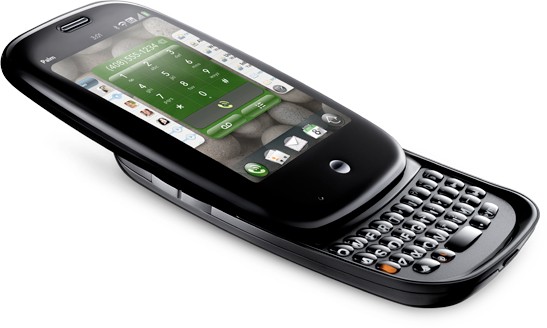
AT&T’s  Palm Pre Plus & Pixi Plus

AT&T’s Palm Pre Plus & Pixi Plus

Basically the same to the Verizon model ,

The Pre Plus will be similar to its Verizon counterpart (16GB of storage, GPS, WiFi, Bluetooth 2.1), and the Pixi should look awfully familiar as well (8GB storage, WiFi, GPS, Bluetooth 2.1), though AT&T will be offering a variation with a blue back plate (in addition to the standard black and other swappable covers)

Palm Pre Plus and Palm Pixi Plus will be available in AT&T stores and online at www.wireless.att.com in the coming months for $149.99 and $49.99, respectively, with a two-year service agreement and after a $100 mail-in rebate.

Keep it too TheGadget411.com for More info!

Popularity: 3% [?]

Posted in Cell PhonesComments (0)

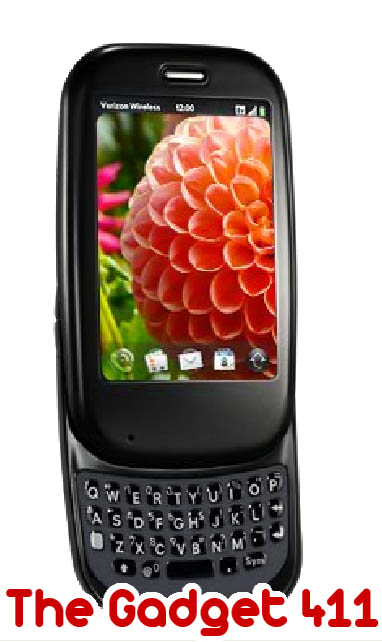
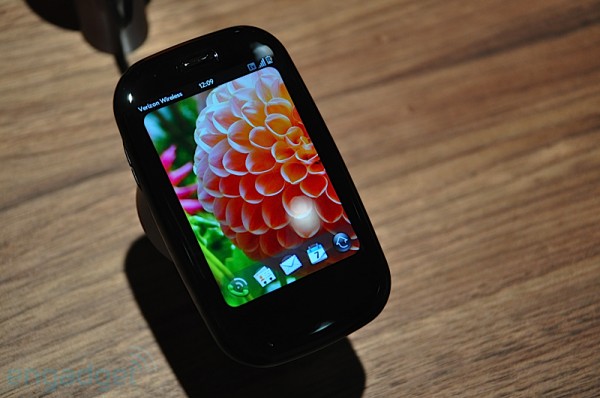
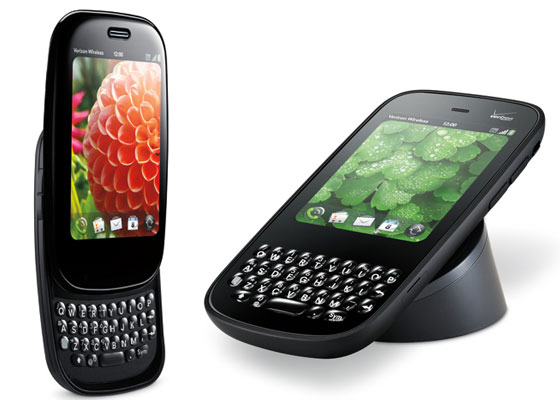
Verizon Palm Pre Plus Review

Verizon Palm Pre Plus Review

Got my hands on The New Verizon Palm Pre Plus.

The Pre plus is basically a upgrade from the Pre on sprint.

Here are the minor changes:

  • The home button on the front is removed on the Pre Plus. Insted of taping the button on the original Pre you would just tap  the slide area below the screen.
  • Sliding mechanism is enhanced
  • keyboard tweaked

The major changes:

  • The Pre Plus has 16GB of internal storage versus 8GB on the original Pre.
  • Touchstone charger capability right out the box.
  • Bluetooth

The Verdict:

Warning: Not for the business man who types  emails alot. This phone has a incredibly small keyboard.With the minor upgrade changes on this device the major change is the network change. Verizon 3g Speeds are amazing. The 16gb of internal memory makes the device more of a media device to watch videos and download tons of apps on.  Also an expected upgrade is comming sometime in Febuary to include video recording and more..


Stay tuned.

This Device is Avaliable NOW!  @ Verizon $149.00 with the $100 mail-in-rebate with a 2 year contract.


Popularity: 5% [?]

Posted in Cell PhonesComments (1)

CES 2010: Palm Pre & Pixi gets a “refresh”

CES 2010: Palm Pre & Pixi gets a “refresh”

The Palm Pre and Pixi got a refresh today. The new names the “Pre Plus” and the “ Pixi plus”. The new Palm phone are going to be available for the Verizon network. Some changes on the device includes better slide mechanism, revamped keyboard,and 16gb  storage space. Check out video Below and also keep it to The Gadget 411 for more info!


Popularity: 5% [?]

Posted in Cell PhonesComments (2)

Sprint Palm Pixi price and release date announced: $99.99 starting November 15

Sprint Palm Pixi price and release date announced: $99.99 starting November 15

Palm-Pixi-Sprint-99

OVERLAND PARK, Kan  –Sprint today announced Nov. 15 as the first day of nationwide availability for Palm® Pixiâ„¢, exclusively available on America’s most dependable 3G network1 from Sprint, It will cost just $99.99 with a two-year service agreement, after a $50 instant rebate and $100 mail-in rebate and be available at Sprint stores, online at www.sprint.com, through telesales at 1-800-SPRINT1, and at Best Buy, RadioShack and select Wal-Mart stores.

“We are excited to offer the new Palm Pixi to our customers in time for the holiday season, and it’s a great addition to Sprint’s industry-leading device portfolio,” said Kevin Packingham, senior vice president – Product Development, Sprint. “Simply put, this phone is fun and easy to use; with its multi-touch screen and full QWERTY keyboard, it’s a great device for messaging and social networking at a price everyone can enjoy, and delivers so many of the great features people love about Palm Pre™ in a fantastic new form factor, making it a huge hit for consumers.”

Running the Palm webOSâ„¢ mobile platform, Palm Pixi lets the user keep multiple activities open and move easily between them, like flipping through a deck of cards, using natural gestures. This allows for easy movement between messaging and email or searching the Web while listening to music, and items are rearranged simply by dragging them. Universal search also makes finding things easy, providing results from both the device and the Web.

Palm webOS brings together the user’s most important information from their phone, at work or on the Web into one logical view. In addition to linking information from Google™, Facebook®, Microsoft® Exchange ActiveSync® and LinkedIn®, Palm Pixi adds Yahoo!® integration to Palm Synergy™3. Palm Synergy offers:

* Linked contacts – A single view that links contacts from a variety of sources, so accessing them is easier than ever.
* Layered calendars – Calendars can be seen on their own or layered together in a single view, combining work, family, friends, sports teams or other interests, and the user can toggle to look at one calendar at a time, or see them all at a glance.
* Combined messaging – See all the conversations with the same person in a chat-style view, including MMS, even if it started in IM and switched to reply with text messaging. The user can also see who’s active in a buddy list right from contacts or email, and start a new conversation with just one touch.

A new Facebook application will be available with Palm Pixi, so users can see and comment on all the latest news from friends and easily update their status. Palm Pixi features an exposed full QWERTY keyboard, multi-touch screen and a durable, removable rubberized back cover.

While Palm Pixi comes with a charger included in the box, Palm recently introduced the Touchstoneâ„¢ charging dock, the first inductive charging solution for phones. Touchstone, along with the Touchstone compatible back cover (both sold separately), allows Palm Pixi to be set on top of the dock without worrying about connection, orientation or fit. The device remains active while charging, allowing access to the touch screen, movies or video, or the speakerphone option. Touchstone is available in Sprint stores nationwide for $79.99 and includes a Touchstone charger and USB wall charger. The Pixi Touchstone back cover is also available for $19.99 (plus taxes).

Palm Pixi requires activation on a pricing plan including unlimited data, such as Sprint’s Everything Data plans with Any Mobile, AnytimeSM, which give customers unlimited mobile calling on the Sprint network to and from any U.S. wireless carrier, unlimited nationwide texting, email, Web browsing and much more, starting at just $69.99. The Simply EverythingSM plan from Sprint offers a truly unlimited experience for only $99.99 per month, a savings of $1,200 over two years versus a comparable AT&T iPhone® plan4. (All price plans exclude surcharges and taxes. Other exclusions apply.)

Customers who subscribe to an Everything Data plan are also automatically enrolled in Sprint Premier, the industry-leading loyalty program. The Premier program provides customers with great benefits such as annual upgrades, discounts on accessories, anniversary rewards, rate plan checkups and “first to know” information about the latest at Sprint.

Palm Pixi will take advantage of the Sprint Mobile Broadband Network (inclusive of data roaming), which reaches more than 269 million people, 18,652 cities and 1,838 airports. The Sprint Networks (inclusive of data roaming) have more than twice the coverage of AT&T’s current 3G network and more than 15 times the coverage of T-Mobile’s current 3G network, both based on square miles5.

Sprint is also the only wireless carrier to offer Ready Now with trained retail associates to work one-on-one with customers to personalize their Palm Pixi, set up features and demonstrate how it works before the customer leaves the store. Customers have the choice of sitting down with a Sprint retail associate at the time of purchase or they can schedule an appointment for a later time at www.sprint.com/storelocator.

Application developers will have a chance to learn more about Palm webOS at Sprint’s ninth annual developer conference beginning today in Santa Clara, Calif. The Sprint Open Developer Conference is open to all developers and will feature information through speaker sessions and coding camps on developing applications for a range of platforms, including webOS. Palm is a premier sponsor of the conference, and Ben Galbraith and Dion Almaer, directors of Developer Relations for Palm, will be giving a keynote address in addition to running several breakout sessions and coding camps focusing on the webOS platform. For details, go to http://developer.sprint.com/devcon2009.

Customers who would like to register to receive additional information about Palm Pixi can register at www.palm.com/pixi.

Popularity: 3% [?]

Posted in Cell PhonesComments (4)

Palm Pixi to be launched in Europe and Canada too

Palm Pixi to be launched in Europe and Canada too

Palm-Pixi-Europe-CanadaAnnounced earlier this morning, the brand new Palm Pixi will be, for the beginning, sold only in the US and only via Sprint.

However, the Pixi will most probably reach Europe and Canada too “ especially since, according to Pocket-lint, a Palm spokesperson declared that the company does plan to bring Palm Pixi to both regions as soon as it can and will announce more when appropriate.


Well, a Pixi release outside the US is unlikely to happen this year “ after all, Europe is still waiting for the Pre to arrive.

O2 is probably the European carrier that will first offer the Pixi.

Coming as Palm™s second WebOS smartphone, the Pixi features a 320 x 400 pixels multi-touch display, full QWERTY keypad, GPS, 3.5mm headset jack, 2MP camera, and 8GB of internal memory. The price of Palm Pixi is not known at the moment, but it will probably be lower than Pre™s price.

Source [Unwiredview]

There’s a great range of o2 phones from dialaphone; check out the website and find the right one for you today!


Popularity: 3% [?]

Posted in Cell PhonesComments (0)

New Palm webOS 1.1 Updates will fix iTunes Sync Issues

New Palm webOS 1.1 Updates will fix iTunes Sync Issues

PalmWebOS

Together with a list of many fixes and improvements, Palm has just released its webOS 1.1 software updates and it will solve your iTunes 8.2.1 sync problem. The new updates has also enhanced the support for Microsoft Exchange ActiveSync (EAS) and improved the photo application opening speed. The webOS 1.1 updates will be sent over-the-air to your Palm Pre directly. You would need to accept the installation to start the update process.

Version information

* Version: webOS 1.1.0
* Release date: 23 July 2009
* Configuration: Sprint 1.7

New applications
NFL Mobile Live from Sprint

* Watch or listen to live NFL games right on your phone.

Feature changes to existing applications
Calendar

* For Calendar accounts you create on your phone, the default reminder intervals are 15 minutes for timed events and one day for all-day events. A few notes:
o This change applies only if software version 1.1 was on your phone when you bought it, or if you did a partial or full erase on your phone and signed in to your Palm profile again after updating to version 1.1. If you simply update your phone to software version 1.1, the default reminder intervals in Calendar do not change.
o This change applies only to Calendar events you create on your phone, not to events that are synchronized to your phone from an online account.

Camera

* The Photos application opens more quickly when launched from the camera.

Clock

* Enhanced support for time zones in Clock.
* When you set an alarm in Clock, an alarm icon appears in the notification area at the bottom of the screen. Tap the icon to display alarm details. Alarm details include the following:
o If the alarm is set for the current day, the alarm time appears.
o If the alarm is set for tomorrow, the alarm time and “Tomorrow” appear.
o If the alarm is set for any day other than today or tomorrow, the day of the alarm appears.

Contacts

* Friends added and deleted in Facebook on the web are now correctly added and deleted in the Facebook account in Contacts on the phone.
* As soon as you create or makes changes to a Google contact on the phone, the phone begins a sync to reflect those changes in Google on the web.

Email

* When you set up an Exchange ActiveSync (EAS) email account, you can enter the mail server name as an IP address.
* Support for self-signed certificates with multiple common names has been added.
* When you reply to an email in HTML format using an EAS account, the formatting of the sender’s original message is now retained in the reply.
* Palm’s EAS implementation now supports several Exchange ActiveSync Policies, including the following:
o PIN/Password Required. IT administrators can ensure a password is assigned to the phone. Administrators can also specify the minimum length of the password.
o Inactivity timeout. IT administrators can ensure that an inactive phone goes into a locked state after a certain time period. You cannot set a higher timeout interval for your phone, but you can set a shorter interval.
o Remote Wipe. IT Administrators can remotely erase all data on a phone from their Exchange console. IT administrators can also have the device wipe itself if an incorrect password is entered more than a specified number of times.

Messaging

* You can enter emoticons in new text, multimedia, and instant messages. Emoticons also display in incoming messages.
* If you set the phone to use a 24-hour time format, the message times shown in a conversation appear in 24-hour time.
* If you go into an IM account’s preferences, all the options are available even if you are signed in to the account. You can tap Remove Account to delete the account, enter a new password to update the password, or tap Sign In to sign in with your updated password. Previously, you needed to sign out of the account before you could use these preferences.
* When you delete an IM account, a message now appears asking you to confirm that you want to delete the account.

Phone

* When multiple missed call notifications are displayed on the dashboard, the time of the most recent missed call is shown.
* When you slide the ringer switch off, a bell icon with a slash is displayed. Previously, the icon was a speaker with a slash.
* In Phone Preferences, the Show Contact Matches preference is now turned on by default. When typing on the keyboard in the phone app, the phone automatically displays both the numbers being entered and any contact matches for the characters entered.

System

* Improved functionality of person reminders. A person reminder is a notification that you create in a contact entry. The notification appears when you have a call or exchange an email, text, multimedia, or IM message with a contact.
* Resolves an issue preventing media sync from working with latest version of iTunes (8.2.1).
* When you enter a search term in Card view or the Launcher to perform a universal search, if you select the Wikipedia web search option, results are shown in the Wikipedia Mobile site instead of the Desktop site.

Web

* You can now use symbols from the symbols table (Sym Sym key icon + key) when you enter text into a web page dialog box.
* If you have a page open at a certain zoom level, leave the page, and use the onscreen Back Web Back button button or the back gesture to return to the page, the zoom level is restored right away.
* A new gesture is now available that works the same as the onscreen Forward Web Forward button button. To move forward through open web pages, make a short swipe left to right in the gesture area.
* When using the Wikipedia drop-down search feature in the address bar, results are shown in the Wikipedia Mobile site instead of the Desktop site.
* When you tap a link, the link appears highlighted to indicate it has been activated, even if it takes a moment for the linked page to open.

YouTube

* After you enter search text, you can tap the Search Search icon icon to perform a search. You still have the option of pressing Enter Enter key to perform the search.

Popularity: 1% [?]

Posted in Cell PhonesComments (1)

New iTunes 8.2.1 Blocked Palm Pre Sync

New iTunes 8.2.1 Blocked Palm Pre Sync

itunes_8-2_palm_pre_sync_blockedFor those who have a Palm Pre and syncing with Apple iTunes, an upgrade to 8.2.1 will break the sync edit(New Palm webOS 1.1 Updates will fix iTunes Sync) Issues(connection as Apple has decided to block the Palm Pre from using iTunes sync. According to the new software update, the new version “provides a number of important bug fixes and addresses an issue with verification of Apple devices
According to Apple,

“iTunes 8.2.1 is a free software update that provides a number of important bug fixes. It also disables devices falsely pretending to be iPods, including the Palm Pre. As we’ve said before, newer versions of Apple’s iTunes software may no longer provide syncing functionality with unsupported digital media players” Natalie Kerris, spokesperson, Apple

Palm did not have a solution for this at the moment, it advise user to stay with iTunes 8.2 if iTunes sync is needed. Otherwise, the music transfer could be done through USB connection or other third party softwares like Missing Sync and DoubleTwist.

Thanks Slashphone!

Popularity: 6% [?]

Posted in Cell Phones, NewsComments (0)

Verizon To Sell the Palm Pre and also, New Blackberry Storm on the Horizon

Well this is good news. Amongst all the rumors swirling around the Palm Pre, it’s predicted shortages, it being dissed even before it comes out, Reuters reports that it was announced today that Verizon will be carrying the Palm Pre in about six months. Great news, because this phone is touted to be Palm’s saving grace and deserves to be on a better carrier than Sprint.
Also in the works is a new version of the Blackberry Storm. Perhaps a head-to-head release? Oooh Fight!

via Reuters

Popularity: 4% [?]

Posted in NewsComments (0)

FIND US!

Tech News