Tag Archive | "News"

Google Does Social Networking? (Video)


If watched the video above you would know a little something about google new tool BUZZ.

Google Buzz seems it was ment to take out the social networking world , such as Twitter / Facebook,  but i think its going to need some major work.  There is nothing special about google buzz that you cant do with Twitter and/or Facebook.
We are just going to have to see where this one goes google.

http://www.google.com/buzz


Popularity: 2% [?]

Posted in Website ReviewsView Comments

Review of The Verizon Motorola Droid by Google


Big thanks to Verizon for this one!.  Launched November 6th is Andriods first device running OS 2.0. Combined with some google apps makes this phone one you must pick up! Check out the video above and Go Comment!.

Popularity: 15% [?]

Posted in Cell Phones, FeaturesView Comments

SAMSUNG UNVEILS TL225 AND TL220 DIGITAL COMPACT CAMERAS FEATURING DUAL LCD SCREENS ON FRONT AND BACK


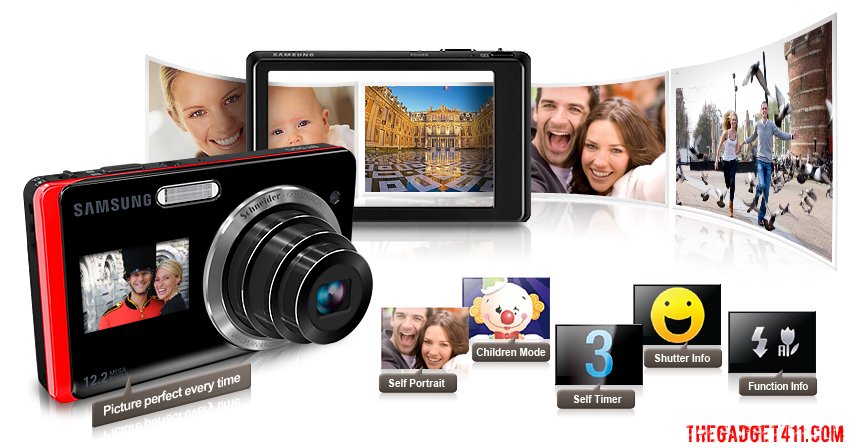
220_frontback_lcdscreensSamsung Electronics America, Inc., today announced the Samsung DualView Cameras, the TL225 and TL220. These 12.2 mega-pixel, innovative compact digital cameras feature Dual LCD screens, with one LCD on the front of the camera, and a second one on the back of the camera, to give consumers the ability to truly step out from behind the camera and put themselves in the picture.

Delivering an unrivalled user experience, the 1.5” LCD located on the front of the Samsung DualView Cameras now allows consumers to take first-rate photos whether they are behind the camera or in front of it. Samsung’s new TL225 also features a 3.5” wide touch-screen back LCD. At 1,152K resolution, the TL225’s LCD delivers almost four times more resolution than traditional cameras and also comes complete with haptic vibration feedback for ease of use. A 12.2 mega-pixel CCD and 27mm wide-angle Schneider-KREUZNACH lens with 4.6x optical zoom gives a wider shooting range from a shorter distance, producing clear, clean images with balanced resolution from the center of the image to the edges.

“These cameras are the very first of their kind,” said Sang Jin Park, CEO of Samsung Digital Imaging Company. “The use of digital imaging technologies has evolved and we are offering functionality and capabilities that no other digital camera manufacturer has yet addressed. It has become more common for the photographer to switch roles and become the subject of his or her photo, especially given the rise in popularity of self-portraits or profile pictures for use with today’s popular social networking sites. The Dual LCD on the TL225 and TL220 allows consumers to become part of the picture in a way that they simply were unable to do so before. These cameras will be must-haves for those individuals that use popular social networking Web sites and for families that want to get everyone, including the photographer, in the picture.”

Showcasing further innovations, Samsung’s Smart Gesture User Interface (UI) with built-in Gravity sensor means that once the camera is on, a simple tap on the front LCD activates it and the camera is automatically set to Self Portrait mode with smile detection. This means that if users want to take a self portrait, they only need to tap and smile, and the picture will be taken automatically without pressing the shutter button. Teamed with innovative Samsung technologies such as Smile Shot, Smart Face Recognition and Smart Auto, users are given the ability to take the perfect image with ease.

Additionally, just by tilting the camera in a certain direction, users can go directly to a different mode or view their saved images. A simple touch or hand gesture is all it takes to access the cameras’ full range of key features. For example, with Samsung’s Smart Auto feature, the worry of photos being washed out, too dark, or out of focus is also now a thing of the past. Smart Auto, which is able to recognize 16 different potential scenes, analyzes key elements of your composition and subject, and then selects the appropriate scene settings in response.

Samsung’s innovative Smart Face Recognition technology will memorize up to 20 faces and adjust the focus and exposure to the most high-ranked faces on the camera. It also allows users to sort images by registered faces and scroll through to find images of people in their Smart Album instead of viewing every single photo.

Alongside professional-grade photos, the TL225 and TL220 record 720p HD video at 30 frames?per-second in H.264 format, providing twice as much recording capacity as MPEG4 format, and four times more than using MJPEG format, all in the palm of your hand. HDMI connectivity means that your HD videos can be enjoyed on any HDTV or HD Monitor.

Samsung DualView Cameras: TL225 and TL220 SPECIFICATIONS

Dual LCD Displays

Samsung DualView Cameras provide the easiest way to take the perfect self-portrait every time with Dual LCDs. On the front of the cameras is a 1.5” LCD that shows you what the picture will look like, so you can now be a subject of the picture, as well as the photographer. Key features of the Dual LCDs include:

· When the camera is turned on, activate the front LCD by tapping the screen. It will automatically be set in Self-Portrait mode, ensuring that the user will always be framed exactly the way they want. You can also turn on the front LCD with a simple selection through the intuitive interface. When in Self-Portrait mode, the camera will also engage its smile detection technology, automatically taking a photo when it recognizes a smile.

· In Child Mode, the front LCD plays a fun animation to capture a child’s attention while taking their photo.

· Shutter Info ensures you take a photo of your subject while they’re smiling. When using Shutter Info, the front LCD will display a “smiley face” when the photographer has the shutter button pushed halfway down, giving the subject a signal that you’re ready to take the photo.

· Function Info helps you keep track of what flash and macro value you’re currently using, as the front LCD provides a visual readout of key camera settings.

· When taking a group photo using the Self-Timer, the front LCD will show a preview of the shot as well as a visual countdown timer so that everyone knows exactly when the photo will be snapped.

Smart Gesture User Interface (UI)

When it comes to smart, user-friendly features, the TL225 and TL220 lead the way. Take for example the cameras’ innovative Smart Gesture UI with built-in Gravity sensor, which lets you quickly access and use key features with either a simple tilt or a hand gesture. To turn on the front LCD, simply tap the screen to activate the display automatically and immediately.

Using other advanced features is just as simple. With the Smart Gesture UI you can quickly scroll through your photos by slightly tilting the device in either direction or by selecting the appropriate photos for a slide show. You can also easily delete photos from your library using the Smart Gesture UI by marking an “X” on the screen using your finger, or you can simply save your favorite photos into a separate folder. Additionally, if you want to rotate an image, you can draw a circle (O) on the screen, and if you want to see the next image in your library you can drag it on to the screen with a sweep of your finger or by simply tilting the device.

3.5” Wide Touch-Screen Back LCD

With 1,152K resolution, the 3.5” wide touch-screen LCD located on the back of the TL225 offers some of the sharpest images of any camera available today, delivering almost four times more resolution than traditional displays. Unlike other digital cameras, the LCD touch-screen uses Samsung’s unique haptic technology, providing users with a slight vibration and audible beep whenever they select an option within the touch-screen display.

12.2 Mega-Pixel CCD, 27mm Wide-Angle Lens with 4.6x Optical Zoom

Samsung DualView Cameras come fully equipped with a true color-filtered 12.2 mega-pixel CCD and boast a powerful 4.6x optical zoom, providing sharp and detailed images. Whether you’re indoors or out, shooting a landscape or friends around a table, the 27mm-wide angle lens plus 4.6x optical zoom gives you a wider shooting range from a shorter distance, delivering greater flexibility than traditional 35mm lenses. Capture images of beautiful landscapes, entire wedding parties, and skyscrapers without having to back up to get the shot. The precisely cut, high?quality 27mm optical lens from Schneider-KREUZNACH delivers clear, clean images with balanced resolution from the center to the edges. Each lens surface is multi-coated to minimize ghosting or flaring for a great shot every time.

Advanced Dual Image Stabilization (IS)

Samsung’s Advanced Dual Image Stabilization (IS) technology allows you to capture crystal?clear, blur-free images. The TL225’s and TL220’s true Dual IS combines both Optical and Digital Image stabilizers to produce sharp images without the confusion commonly found in other cameras. The Optical IS intelligently compensates for hand trembling by shifting the lens in the opposite direction. When Optical IS isn’t quite enough, the Digital IS automatically takes over to ensure blur-free images.

HD Video Recording

Besides the ability to take high-quality digital still images, Samsung DualView Cameras also offer impressive 720P HD video recording at 30 frames per second. The TL225 and TL220 use the H.264 format which allows you to record twice as much content as MPEG4, and four times more than MJPEG, the format typically used in other digital cameras. The TL225 also offers HDMI connectivity (adapter sold separately) so that you can enjoy your HD video, as well as digital still images, on an HDTV or HD monitor.

Smart Auto

Samsung’s Smart Auto feature ensures that users never have to worry about their photos being washed out, too dark or out of focus. Smart Auto analyzes key elements of your composition such as color, brightness, motion and subject and then selects the appropriate scene mode which will produce the best results possible.

Smart Album

With Samsung’s convenient Smart Album feature, you can quickly scroll through your entire library of images and organize them in the way that’s best for you. This unique feature allows you to organize photos by Favorite (if tagged as a “favorite” photo), Face (someone you’ve taken many photos of), Timeline (date photos were taken), Week, Color, and Content (photos, videos, voice-note).

Perfect Portrait System

Picture-perfect moments at their best

Samsung’s Perfect Portrait System takes the guess work out of shooting beautiful portraits. Key features of this system are Samsung’s Smile Shot and Blink Detection technologies which automatically detect when your subjects are smiling and if their eyes are closed, allowing you to capture them looking their best. Another advanced feature is the Red-eye Fix mode. This in?camera feature automatically fixes the typical red-eye associated with the use of the flash, before the photo is produced, a significant time saver as you don’t have to spend time afterwards removing red-eyes from your photos.

Smart Touch Shooting and Auto-Focus

Sometimes the focal point of your picture is not always in the center of the frame. In cases like this, the TL225’s and TL220’s Smart Touch Auto Focus feature allows you to focus on a different part of the shot by simply touching the desired area. That means your subject, no matter where in the frame it may be, will always be in focus. Once you’ve selected the focal point, you can simply leave your finger on the screen for two seconds or push the shutter button to take the picture.

Smart Face Recognition

The TL225 and TL220 feature Samsung’s advanced Face Recognition technology which automatically stores up to 20 preferred faces to the cameras’ internal memory. While taking a portrait, the TL225 and TL220 will automatically recognize if one of the user’s preferred faces is in the frame and identify them as a priority for focus and exposure. Users can also save time sorting through their photos by searching only for those that contain a specific face.

Beauty Shot

Samsung’s Beauty Shot feature lets you remove all the imperfections on your subject’s face such as wrinkles, blemishes, and moles. Simply select one of two editing options to even out skin tone and complexion.

Photo Style Selector and Highlight Feature

Samsung DualView Cameras are designed to help you enhance your creativity when it comes to digital imaging. Samsung’s Photo Style Selector allows you to transform your photos from simple memories to works of art. Choose from a wide selection of artistic treatments ranging from classic black and white to something more vivid, giving you full control over the color tones of your image. Additionally, with Samsung’s unique highlight feature, you can focus on one area of your photo and blur everything around it, turning a normal photo into something much more complex.

Popularity: 29% [?]

Posted in Features, NewsView Comments

Netvibes.com Rolls Out Multiple Personal Pages


Ok, so I’m all over the internets. I am a News hound, Blog follower, Shopaholic, Social Media Junkie, and I often have a billion (ok, 10 ) tabs open in my browser at any one time. I wished, “If there was only one place I could have all my favorite internet hot spots all in one place….” And of course, there is such a wonderful place. It’s called Netvibes.com.

I completely dig this site because not only does it come with a staggering array of modules to choose from to customize your personal page, but you can add just about any content or RSS feed that you want to also. It’s so super easy.

And just last week, Netvibes rolled out some major changes. Now you can have Multiple Personalized Pages. This lets users better organize their collected widgets and also give more control over accounts and decide what gets posted publicly. You can also have mulitple accounts and personalize everything.

Here’s the Deets about the features:

Multiple Personalized Pages (MPP) introduce new page publishing and management tools, leveraging Netvibes startpage technology into a rapid publishing platform for users, marketers and enterprises. MPP can be used to create infinite:
- Business Dashboards: Monitor industry, client and competitor news, alongside calendars, CRM and workplace tools.
- Topic Pages: Track favorite hobbies, sports teams, entertainment news, etc.
- People Pages: Follow friends, family and social activity feeds.
- Public Pages: Publish a small business website, online portfolio, aggregated social profile dashboards, etc. Like iWeb, but better, easier.
- Branded Microsites (for marketers): Rapidly publish user-personalizable brand, product and media portals with Netvibes Premium Universe.
- Enterprise Portals (for large companies): Deploy employee dashboards, intranets and user-personalizable websites on a global scale with Netvibes Enterprise
- Startpages: Oh yeah, you can still make startpages, too, but the point is that MPP let’s you do way more.

So what does this all mean? Lots!
With Multiple Personalized Pages, users have unlimited room to make as many personalized pages as they like, it’s way super fast to remix and add all your widget content, it’s really easy to manage multiple accounts from one dashboard, and you can organize each page as you wish. All your different interests will have it’s own home in netvibes. You can also publish as many separate pages as you want, and you can personalize everything just to your tastes: no ads, logos, forced search bars, etc. There is no limit to what you can do and present on Netvibes. From personal hobbies to enterprise solutions, Netvibes will let you aggreate all your favorite sites and you have the power to customize everything just how you like it. Give it a spin, and there’s lots more screenshots after the jump. Sign up, get your page started at www.netvibes.com, you can find my public page here: target="_blank">http://www.netvibes.com/lizmoney

Popularity: 2% [?]

Posted in Website ReviewsView Comments

Leaked: ATT Slated to Get Android Handset, the HTC Lancaster


zOMG, who’s excited? Android’s little cheerleader is! Check this out: According to the leaked slide on Engadget, the HTC Lancaster feature quadband EDGE and 850 / 1900MHz HSPA, AGPS, a 3 megapixel fixed-focus camera, Bluetooth 2.0, microSD expansion, and a “unique HTC social messaging user interface”. The display is oddly only 2.8” and not 3.2” with QVGA 240 x 320 pixels. Targeted date is early August, no word on price yet, but I am totes excited to see this development for Google Android!

Popularity: 9% [?]

Posted in NewsView Comments

Breaking! iPhone OS 3.0 Speculation: Kevin Rose


O RLY?

Kevin Rose predicts that the iPhone update 3.0 WILL include cut and paste ability? The actual announcement of the OS update is not until tomorrow, but there have been some pretty juicy deets that have been circulating, and this is the latest. Peep the vid here.

full article at wired

Popularity: 1% [?]

Posted in NewsView Comments

Zune 3.1 and a Zune Pass upgrade


Last week Microsoft released its latest update to the Zune software. Version 3.1 brings us Checkers, Space Battle, and that extremely addicting game Sudoku. Along with the update to the games list, came some behind the scenes work to help fix reliability of the Zune software. This update came as a surprise as the 3.0 update had only just come out two months before, and so far the updates to the software have been separated by months at a time. Along with the update to the software came an update to the Zune Pass. Now along with your unlimited access to the Zune library, you also receive a monthly credit for ten free songs. On the official blog for the Zune, Cesar Menendez from Microsoft lists some answers to some common questions about the ten free songs, but as you read this you quickly learn that as can be expected there is a catch. There is no rollover, so you better make sure to use all ten credits as soon as you can, because they also don’t tell you exactly when your ten credits will refresh monthly. The blog post also states that almost 90% of the Marketplace Library is in MP3 format, which is nowhere near the truth, as of a week after the update only about two-thirds of the library is in MP3 format, and most of the more mainstream music is still in WMA. While I think there is some fine tuning that needs to be done to this deal I do think this is definitely a major improvement for the Zune pass.
Popularity: 1% [?]

Posted in UncategorizedView Comments

ASUS releases P565 PDA


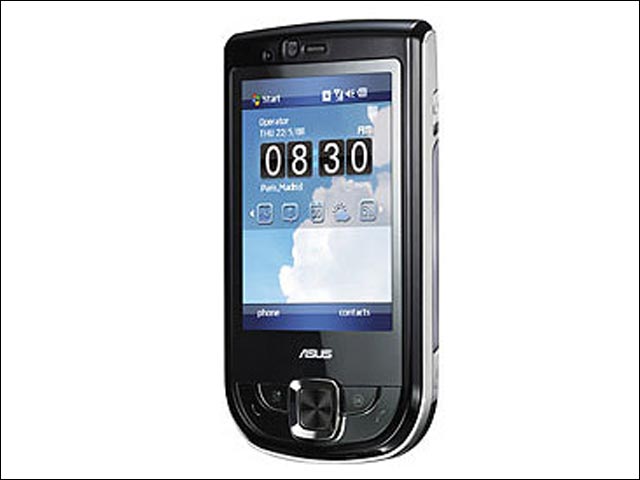
ASUS has introduced the ASUS P565, a business PDA phone that boasts an 800 MHz processor. Featuring ASUS’ latest touch-driven user interface called Glide UI, the P565 comes with a 2.8″ touchscreen running at a high resolution of 480 x 640 pixels, 3 megapixel camera, built in GPS, WiFi and support HSDPA data connection. The fast processor renders the P565 particularly amenable to multitasking, while Glide enables users to switch between tasks rapidly with their fingertips. The P565 also comes with a potent suite of business-oriented features and software, including push mail, business card recognition and Microsoft Office Mobile. Other useful applications such as Anytime Launcher and Multi-Home enable users to view their calendars, the times of local and visiting cities, weather reports, online news and much more-all with an intuitive tap, slide or flick of their fingers

Popularity: 1% [?]

Posted in UncategorizedView Comments

Storm Release date


After much of rumors and leaked info, Verizon Wireless today said that it will start selling the BlackBerry Storm on November 21st to all consumers and corporate customers. The price of the touch screen phone will start from $199.99, which required a 2-year service contract and after a $50 MIR.

Thanks to Slashphone

Popularity: 1% [?]

Posted in UncategorizedView Comments


Sign Up For Tech Updates!
* indicates required

Powered by MailChimp