Tag Archive | "Product"

MountMe Announces Pre-Order of Freedom, a iPad Wall Mount

MountMe Announces Pre-Order of Freedom, a iPad Wall Mount

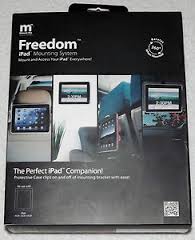
MountMe, a company dedicated to bringing one of a kind mounting accessories and solutions to iPad users, is pleased to announce the availability of Freedom™ for pre-order, the only all-in-one carrying and mounting device on the market. Freedom is a sleek protective case for iPad that easily transforms into a highly adaptable and practical mounting device. This visible but unobtrusive all-in-one universal mounting solution is a must have accessory for the kitchen, lounge, bedroom, study, garage, car, airplane, boat and more. Freedom comes in a variety of colors including blue, turquoise, white, purple, metallic grey, red, pink and black. Pre-order now at www.mount-me.com and receive a 10% discount (one color) on the purchase of one Freedom or a 25% discount on the purchase of two different colored units, plus free shipping in the continental U.S. for a limited time only.


With this universally adaptable mounting solution, the iPad can be easily transformed into a great in-car or on-the-go entertainment system, a wall clock, home automation controller and more. The possibilities and uses are endless. It can be mounted and viewed virtually anywhere including:


• Home

• Work

• Professional Offices

• Classrooms

• Doctor’s Offices

• Hotel Lobbies

• Car Seats

• Head Rests

• Airplane seats

• Walls

• Mirrors

• Windows

• Refrigerators

• Kitchen Cabinets

• Car Visors

• Car and Boat Dashboards

“We are happy to offer this special discount to early adopters who wish to pre-order their Freedom unit now, can be one of the first to start using our all-in-one solution for the iPad that provides freedom of viewing practically anywhere without cumbersome attachments and multiple docking/mounting options,” says Brien Spina, Founder of MountMe.

Freedom features and functions include:


• Heavy Duty Mobile Mounting Strap – Allows you to securely mount your tablet to a headrest, car visor, your leg, and any other object you can wrap a strap around


• Four Suction Cups – Suction cups effortlessly attach to the small bracket portion of the Freedom Mount, and allow a secure mounting option for hard surfaces such as glass, mirrors or a refrigerator


• Screws – Provide for permanent mounting options on a wall or other solid object


• Panning & Tilting Capabilities – The ability to pan 360 degrees and tilt 90 degrees provides unlimited mounting and user capabilities


• Built-in Kickstand – The unique patented design bracket acts as a kickstand for your favorite photo album or by simply reversing the bracket with a turn of the wrist; it will put the tablet into an ideal typing position


• Quick Release On/Off Bracket – MountMe has developed a quick release on/off bracket that allows you to freely and effortlessly remove the tablet from its mounting position to a mobile position while providing the user with a heavy duty attractive protective carrying case


• Special Gripping Surface – The carrying case has been strategically designed to allow for a comfortable gripping surface on any of the four sides that will conform to the palm of your hand which makes such activities as gaming even better


• Symmetrical Flat Back Eliminates Wobbling – MountMe has also solved the wobbling that occurs when an iPad is placed on a flat surface by creating a symmetrical flat back portion of the carrying case creating a perfect user experience


Protect and mount your iPad with a case that makes it accessible and secure anywhere. For more information about MountMe Freedom and other productions visit www.mount-me.com

Popularity: 4% [?]

Posted in AppleComments (0)

SAMSUNG UNVEILS TL225 AND TL220 DIGITAL COMPACT CAMERAS FEATURING DUAL LCD SCREENS ON FRONT AND BACK

SAMSUNG UNVEILS TL225 AND TL220 DIGITAL COMPACT CAMERAS FEATURING DUAL LCD SCREENS ON FRONT AND BACK

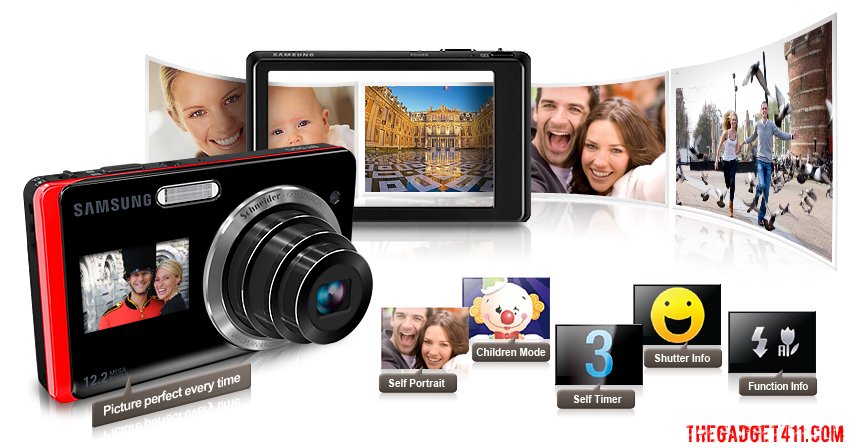
220_frontback_lcdscreensSamsung Electronics America, Inc., today announced the Samsung DualView Cameras, the TL225 and TL220. These 12.2 mega-pixel, innovative compact digital cameras feature Dual LCD screens, with one LCD on the front of the camera, and a second one on the back of the camera, to give consumers the ability to truly step out from behind the camera and put themselves in the picture.

Delivering an unrivalled user experience, the 1.5” LCD located on the front of the Samsung DualView Cameras now allows consumers to take first-rate photos whether they are behind the camera or in front of it. Samsung’s new TL225 also features a 3.5” wide touch-screen back LCD. At 1,152K resolution, the TL225’s LCD delivers almost four times more resolution than traditional cameras and also comes complete with haptic vibration feedback for ease of use. A 12.2 mega-pixel CCD and 27mm wide-angle Schneider-KREUZNACH lens with 4.6x optical zoom gives a wider shooting range from a shorter distance, producing clear, clean images with balanced resolution from the center of the image to the edges.

“These cameras are the very first of their kind,” said Sang Jin Park, CEO of Samsung Digital Imaging Company. “The use of digital imaging technologies has evolved and we are offering functionality and capabilities that no other digital camera manufacturer has yet addressed. It has become more common for the photographer to switch roles and become the subject of his or her photo, especially given the rise in popularity of self-portraits or profile pictures for use with today’s popular social networking sites. The Dual LCD on the TL225 and TL220 allows consumers to become part of the picture in a way that they simply were unable to do so before. These cameras will be must-haves for those individuals that use popular social networking Web sites and for families that want to get everyone, including the photographer, in the picture.”

Showcasing further innovations, Samsung’s Smart Gesture User Interface (UI) with built-in Gravity sensor means that once the camera is on, a simple tap on the front LCD activates it and the camera is automatically set to Self Portrait mode with smile detection. This means that if users want to take a self portrait, they only need to tap and smile, and the picture will be taken automatically without pressing the shutter button. Teamed with innovative Samsung technologies such as Smile Shot, Smart Face Recognition and Smart Auto, users are given the ability to take the perfect image with ease.

Additionally, just by tilting the camera in a certain direction, users can go directly to a different mode or view their saved images. A simple touch or hand gesture is all it takes to access the cameras’ full range of key features. For example, with Samsung’s Smart Auto feature, the worry of photos being washed out, too dark, or out of focus is also now a thing of the past. Smart Auto, which is able to recognize 16 different potential scenes, analyzes key elements of your composition and subject, and then selects the appropriate scene settings in response.

Samsung’s innovative Smart Face Recognition technology will memorize up to 20 faces and adjust the focus and exposure to the most high-ranked faces on the camera. It also allows users to sort images by registered faces and scroll through to find images of people in their Smart Album instead of viewing every single photo.

Alongside professional-grade photos, the TL225 and TL220 record 720p HD video at 30 frames?per-second in H.264 format, providing twice as much recording capacity as MPEG4 format, and four times more than using MJPEG format, all in the palm of your hand. HDMI connectivity means that your HD videos can be enjoyed on any HDTV or HD Monitor.

Samsung DualView Cameras: TL225 and TL220 SPECIFICATIONS

Dual LCD Displays

Samsung DualView Cameras provide the easiest way to take the perfect self-portrait every time with Dual LCDs. On the front of the cameras is a 1.5” LCD that shows you what the picture will look like, so you can now be a subject of the picture, as well as the photographer. Key features of the Dual LCDs include:

· When the camera is turned on, activate the front LCD by tapping the screen. It will automatically be set in Self-Portrait mode, ensuring that the user will always be framed exactly the way they want. You can also turn on the front LCD with a simple selection through the intuitive interface. When in Self-Portrait mode, the camera will also engage its smile detection technology, automatically taking a photo when it recognizes a smile.

· In Child Mode, the front LCD plays a fun animation to capture a child’s attention while taking their photo.

· Shutter Info ensures you take a photo of your subject while they’re smiling. When using Shutter Info, the front LCD will display a “smiley face” when the photographer has the shutter button pushed halfway down, giving the subject a signal that you’re ready to take the photo.

· Function Info helps you keep track of what flash and macro value you’re currently using, as the front LCD provides a visual readout of key camera settings.

· When taking a group photo using the Self-Timer, the front LCD will show a preview of the shot as well as a visual countdown timer so that everyone knows exactly when the photo will be snapped.

Smart Gesture User Interface (UI)

When it comes to smart, user-friendly features, the TL225 and TL220 lead the way. Take for example the cameras’ innovative Smart Gesture UI with built-in Gravity sensor, which lets you quickly access and use key features with either a simple tilt or a hand gesture. To turn on the front LCD, simply tap the screen to activate the display automatically and immediately.

Using other advanced features is just as simple. With the Smart Gesture UI you can quickly scroll through your photos by slightly tilting the device in either direction or by selecting the appropriate photos for a slide show. You can also easily delete photos from your library using the Smart Gesture UI by marking an “X” on the screen using your finger, or you can simply save your favorite photos into a separate folder. Additionally, if you want to rotate an image, you can draw a circle (O) on the screen, and if you want to see the next image in your library you can drag it on to the screen with a sweep of your finger or by simply tilting the device.

3.5” Wide Touch-Screen Back LCD

With 1,152K resolution, the 3.5” wide touch-screen LCD located on the back of the TL225 offers some of the sharpest images of any camera available today, delivering almost four times more resolution than traditional displays. Unlike other digital cameras, the LCD touch-screen uses Samsung’s unique haptic technology, providing users with a slight vibration and audible beep whenever they select an option within the touch-screen display.

12.2 Mega-Pixel CCD, 27mm Wide-Angle Lens with 4.6x Optical Zoom

Samsung DualView Cameras come fully equipped with a true color-filtered 12.2 mega-pixel CCD and boast a powerful 4.6x optical zoom, providing sharp and detailed images. Whether you’re indoors or out, shooting a landscape or friends around a table, the 27mm-wide angle lens plus 4.6x optical zoom gives you a wider shooting range from a shorter distance, delivering greater flexibility than traditional 35mm lenses. Capture images of beautiful landscapes, entire wedding parties, and skyscrapers without having to back up to get the shot. The precisely cut, high?quality 27mm optical lens from Schneider-KREUZNACH delivers clear, clean images with balanced resolution from the center to the edges. Each lens surface is multi-coated to minimize ghosting or flaring for a great shot every time.

Advanced Dual Image Stabilization (IS)

Samsung’s Advanced Dual Image Stabilization (IS) technology allows you to capture crystal?clear, blur-free images. The TL225’s and TL220’s true Dual IS combines both Optical and Digital Image stabilizers to produce sharp images without the confusion commonly found in other cameras. The Optical IS intelligently compensates for hand trembling by shifting the lens in the opposite direction. When Optical IS isn’t quite enough, the Digital IS automatically takes over to ensure blur-free images.

HD Video Recording

Besides the ability to take high-quality digital still images, Samsung DualView Cameras also offer impressive 720P HD video recording at 30 frames per second. The TL225 and TL220 use the H.264 format which allows you to record twice as much content as MPEG4, and four times more than MJPEG, the format typically used in other digital cameras. The TL225 also offers HDMI connectivity (adapter sold separately) so that you can enjoy your HD video, as well as digital still images, on an HDTV or HD monitor.

Smart Auto

Samsung’s Smart Auto feature ensures that users never have to worry about their photos being washed out, too dark or out of focus. Smart Auto analyzes key elements of your composition such as color, brightness, motion and subject and then selects the appropriate scene mode which will produce the best results possible.

Smart Album

With Samsung’s convenient Smart Album feature, you can quickly scroll through your entire library of images and organize them in the way that’s best for you. This unique feature allows you to organize photos by Favorite (if tagged as a “favorite” photo), Face (someone you’ve taken many photos of), Timeline (date photos were taken), Week, Color, and Content (photos, videos, voice-note).

Perfect Portrait System

Picture-perfect moments at their best

Samsung’s Perfect Portrait System takes the guess work out of shooting beautiful portraits. Key features of this system are Samsung’s Smile Shot and Blink Detection technologies which automatically detect when your subjects are smiling and if their eyes are closed, allowing you to capture them looking their best. Another advanced feature is the Red-eye Fix mode. This in?camera feature automatically fixes the typical red-eye associated with the use of the flash, before the photo is produced, a significant time saver as you don’t have to spend time afterwards removing red-eyes from your photos.

Smart Touch Shooting and Auto-Focus

Sometimes the focal point of your picture is not always in the center of the frame. In cases like this, the TL225’s and TL220’s Smart Touch Auto Focus feature allows you to focus on a different part of the shot by simply touching the desired area. That means your subject, no matter where in the frame it may be, will always be in focus. Once you’ve selected the focal point, you can simply leave your finger on the screen for two seconds or push the shutter button to take the picture.

Smart Face Recognition

The TL225 and TL220 feature Samsung’s advanced Face Recognition technology which automatically stores up to 20 preferred faces to the cameras’ internal memory. While taking a portrait, the TL225 and TL220 will automatically recognize if one of the user’s preferred faces is in the frame and identify them as a priority for focus and exposure. Users can also save time sorting through their photos by searching only for those that contain a specific face.

Beauty Shot

Samsung’s Beauty Shot feature lets you remove all the imperfections on your subject’s face such as wrinkles, blemishes, and moles. Simply select one of two editing options to even out skin tone and complexion.

Photo Style Selector and Highlight Feature

Samsung DualView Cameras are designed to help you enhance your creativity when it comes to digital imaging. Samsung’s Photo Style Selector allows you to transform your photos from simple memories to works of art. Choose from a wide selection of artistic treatments ranging from classic black and white to something more vivid, giving you full control over the color tones of your image. Additionally, with Samsung’s unique highlight feature, you can focus on one area of your photo and blur everything around it, turning a normal photo into something much more complex.

Popularity: 15% [?]

Posted in Features, NewsComments (0)

CES 2009: Sony Vaio P widescreen Netbook UNVEILD

smallish_3177731439_57f301a17e_oPress Release:

Sony today took the wraps off the world’s lightest 8-inch notebook— the new VAIO® P Series Lifestyle PC.
About the size of a business envelope and roughly as thin as a cell phone, the VAIO Lifestyle PC weighs just 1.4 pounds and is small enough to slip into a jacket pocket or handbag while integrating full-PC features.
The model incorporates a high-resolution, 1600 x 768, LED backlit 8-inch ultra-wide display (diagonal), making it easy to view everything from entire spreadsheets to full web pages— no side-to-side scrolling necessary. It also incorporates Sony’s XBRITE-ECO™ LCD technology, producing images in brilliant detail for razor-sharp viewing on-the-go.

Stylish enough to take anywhere, the unit is available in an array of eye-catching colors, including garnet red, emerald green, onyx black, crystal white and classic black. Matching carrying cases and Bluetooth® color-coordinated mice are available to complete the look.“The VAIO P Series Lifestyle PC is your portal to the world, delivering entertainment and computing in a head-turning device that’s small enough to put in your pocket,” said Mike Abary, senior vice president of VAIO product marketing at Sony Electronics. “Designed for the fashionista in all of us, it’s the ideal companion.”
Engineered to provide the feel of a larger notebook, the VAIO Lifestyle PC provides a convenient typing experience by extending the keyboard to the perimeters of the chassis maximizing the typing area. The spacing between keys has also been engineered to help reduce typing mistakes making it perfect for long fingernails.
The notebook incorporates built-in wireless WAN 3G Mobile Broadband, 802.11n wi-fi and Bluetooth technologies. Users can toggle among various wireless options for the most efficient connection – Wi-Fi for working at a coffee shop; Bluetooth for peripherals; and Mobile Broadband service on the Verizon Wireless nationwide network when traveling outside the reach of hotspots (subscription required).
The unit features up to four hours of battery life with the included standard capacity battery and eight hours with the large capacity battery (sold separate).
It also incorporates real-time GPS functionality, making it easy to find restaurants, hotels or special sites of interest. Destinations can be found by simply typing in an address or keyword and then following the turn-by-turn directions. The Lifestyle PC even includes estimated drive times to let you know how far you are from a destination. No Internet connection is required in the United States or Canada.
The unit also has an instant-mode option that launches directly into Sony’s Xross Media Bar™ interface, so you can rapidly boot up and access music, video, photos and the Web. A built-in webcam lets you video chat with family, friends and colleagues. A third-party service is required.
The PC comes with the Windows Vista® operating system, supporting office applications and all the software programs routinely found in full-size notebooks. A windows arrangement utility has been added to easily organize all open documents or websites with one touch, positioning them neatly along side each other on a single screen.
The VAIO P Series Lifestyle PC will retail for about $900. It will be available for pre-orders tomorrow online at www.sony.com/pr/pseries. It will also be sold at Sony Style® stores starting later this month and at other major retailers around the country beginning in February.

passport_red_mg_4759

Popularity: 7% [?]

Posted in CES 2009Comments (0)

Palm Treo Pro *REVIEWED*

To start out The Gadget 411′s first review we will like to give a big thanks to Palm and A & R Edelman and our contacts Justine and Rosie Pulido, for providing the Treo pro.

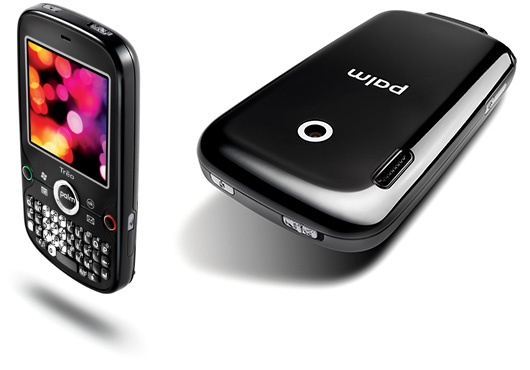
The Treo pro is a smartphone by Palm Inc; with windows mobile 6 with wifi  and GPS capabilities. The Excellent qwerty keypad and  shortcut buttons make navigation on the Treo great! On the top of the phone it has a handy “silencer”  which switches all phone noises to vibrations.

The Home screen getting the what info you need. At the top of the screen is a start botton then all the connections you are connected to. Also, on the home screen is unread text messages,upcoming appointments,and an revonlutionary Google search Yes! right on the homescreen.

After reviewing some of the applications, There all great!  TeleNav is a GPS navigation app where you can call in and tell where your trying to go and it automatically syncs the information to your phone and give you the turn by turn directions.The Internet on the phone is great, webpages adopt well .Included on the  phone as well was mobile office witch was great for viewing your documents on the go.

Last but not least is playing videos. I visited Youtube on the phone and watch some videos and no problems with that.

My overall review of the Phone is an 9.5 out of 10 .

-.5 for the keyboard being a little to small.

Update :

The Call quality is great.

The reception is good on At&t, but the phone comes GSM unlocked.

Battery life, forgot to mention this one. The battery said 10 percent remaining for 2 days , and internet was running in the background.  So , Take it for your self about the battery life.

anymore infomation about the Treo you can email me dezmon@thegadget411.com or visit http://tinyurl.com/TreoPro01

Popularity: 15% [?]

Posted in Cell PhonesComments (0)

ASUS releases P565 PDA

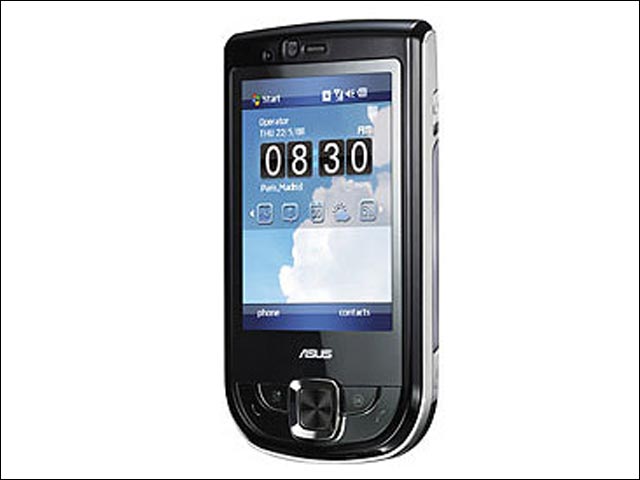
ASUS has introduced the ASUS P565, a business PDA phone that boasts an 800 MHz processor. Featuring ASUS’ latest touch-driven user interface called Glide UI, the P565 comes with a 2.8″ touchscreen running at a high resolution of 480 x 640 pixels, 3 megapixel camera, built in GPS, WiFi and support HSDPA data connection. The fast processor renders the P565 particularly amenable to multitasking, while Glide enables users to switch between tasks rapidly with their fingertips. The P565 also comes with a potent suite of business-oriented features and software, including push mail, business card recognition and Microsoft Office Mobile. Other useful applications such as Anytime Launcher and Multi-Home enable users to view their calendars, the times of local and visiting cities, weather reports, online news and much more-all with an intuitive tap, slide or flick of their fingers

Popularity: 1% [?]

Posted in UncategorizedComments (0)


FIND US!

Tech News